Pages

  • Twitter
  • Facebook
  • Google+
  • RSS Feed
Showing posts with label apple tablet. Show all posts

Wednesday, April 30, 2014

Last year Apple went where I never thought it would, with the iPad mini bringing the Apple tablet experience to a brave new budget world.
Now usurped by the new iPad Mini 2, the older tablet is still on sale at a wallet-friendly £249 for the basic version, with 16GB of storage on offer for the Wi-Fi version on Apple's site (although it can be had slightly cheaper if you shop around).
You can also add 4G cellular, which brings the price up to £349. This entry-level model comes in a single 16GB capacity, while the iPad mini with Retina display goes up to 128GB, costing a whopping £659 for the top model which also includes 4G.
Then again, the first generation iPad mini isn't about top-end specs with a whopping price tag – it's about beating the likes of the Google Nexus 7 and Amazon Kindle Fire HD in the budget stakes.
ipad mini review
The two competitors have been getting plenty of column inches thanks to their super-cheap prices and the impressive specs on board. But with both offering only a 7-inch screen compared to Apple's 7.9-inch display, the Cupertino company is confident its device will win over budget-conscious consumers.
However, more frugal shoppers may not agree with this idea, as the Nexus 7 and Kindle Fire HD cost quite a bit less. When faced with a choice between the three, they might opt for the familiar Amazon brand or the sheer power of the Nexus 7, with its impressive spec list and legions of Google apps.
iPad mini review
That said, Apple fans need not worry too much when it comes to whether the iPad mini is a worthy addition to the iBrand. It comes with enough power and is Ive-inspired enough to make it a worthwhile addition to the range. This isn't a shrunken-down iPad, it's a whole new product all over again.
Be it the larger screen size, impressively low weight or alternative design compared to the competition, there's a lot to chew over when it comes to the iPad mini. But is it worth spending your hard-earned cash when a handful more will get you larger version of Apple's tablet? And how does it stack up next to the second-generation mini with its higher resolution display and faster hardware?

Features and design

The iPad mini exists because the market started to dictate its presence…but that doesn't mean Apple doesn't want to put its own spin on things.
To that end, the border has been reduced and the screen is larger at 7.9 inches relative to the dimensions of the original iPad. Additionally, the design is completely different to the likes of the Google Nexus 7. In fact the whole ethos has been created from the ground up, partly under the stewardship of Sir Jony Ive, according to Apple.
iPad mini review
None of that really matters though. What is important is the fact that it's a superbly designed device that gives a measure of why it costs so much more than the likes of the Kindle Fire HD.
The aluminium chassis shares the same colouring as the iPhone 5S, with the darker black slate and white silver options both bringing a touch of class to proceedings.
iPad mini review
At 308g it's twice the weight and then some of the iPhone 5S, but compared to other tablets on the market (and combined with the aluminium chassis) it feels lightweight in the hand.
The screen is something of a worry though – with the 1024x768 resolution in the expansive display, you only get a sharpness akin to the iPhone 3GS. While the display quality is better than that thanks to improved IPS LCD technology, it's still light years behind the Retina display on the bigger iPad Air and the second-generation mini.
iPad mini review
If you own a modern iPad, you'll notice the difference straight away. But then if you have one of these, then you won't want an iPad mini.
The tablet will struggle to impress iPhone users, as it doesn't have the wow factor of Apple's smaller devices.
In a side-by-side test of the same movie running on the iPad mini, the Nexus 7 and the Kindle Fire HD, the iPad looked the least impressive (although the contrast ratio was certainly more than decent in my eyes).
iPad mini review
Then there's the issue of holding the actual tablet. As Apple says, it's as light as a pad of legal paper, and there's definitely no risk of it causing wrist strain. However, the iPad mini doesn't really lend itself that well to any manner of grip.
iPad mini review
The most comfortable and secure way to hold a tablet is to grip right around the back – something Apple thinks you can do easily according to its promotional materials.
Well, you're wrong there, Cupertino-gadget-people. It's just too far to stretch around with average-sized hands. Instead you're forced to hold it in the corner, covering part of the screen. It's good that Apple has chucked some technology in there to distinguish an intentional touch from an accidental one, but it's not the most comfortable way to use the device.
In landscape orientation using two hands, the iPad mini is a much nicer device to hold, with the aluminium covering giving it a nicely textured back. However, the aluminium covering similar to the iPhone 5 has led to another design problem: scratching.
iPad mini review
The handsets have been getting criticism for exposing the silver metal below with minimal scratching. This started to happen within a day on the iPad mini – which is all the more confusing seeing as it doesn't live in the pocket with keys and coins.
It's something we hoped Apple would have changed in the manufacturing process, and means you'll need to keep an eye on how you look after the tablet or invest in a protective case immediately.
The top and bottom of the bezel are wide enough to comfortably rest your hands on, while web browsing and accelerometer-based gaming in landscape orientation is excellent.
The rest of the design is predictably ergonomic. The volume rocker keys are close but not too near to the mute switch on the top right-hand side.
This is near the power button, which is intuitively placed to be easy to hit when you want to reactivate the iPad mini… although many will just hit the home button to achieve the same thing.
iPad mini review
The traditional Apple home key remains, although it's shrunken somewhat to fit into the smaller chassis. However, during testing I found it just as easy to hit, despite the dinkier dimensions.
It's interesting that Apple has popped the headphone jack at the top of the iPad mini, given it's put so much effort into repositioning it at the bottom of the iPhone 5S and 5C... but I do prefer it staying above the screen.
The speakers sit at the bottom of the iPad mini, flanking the Lightning connector, which offers faster speeds of data transfer and can be connected either way round. This is handy when you're charging before bed and can't be bothered to put the light on.
The speakers provide decent enough sound, but in landscape mode they create a distorted sense of audio because of their mono-directional firing.
iPad mini review
The processor inside is Apple's last-generation A5 effort, which may worry some, but it's likely to be enough for most actions, coupled as it is with 512MB of RAM. It's still miles away from the raw grunt of the new Google Nexus 7 or the iPad Air with its A7 processor, but Apple reckons it helps it hit a sweet spot in terms of price.
Apple also has expertise in optimising iOS to run as well as possible on older hardware, and iOS 7.1 certainly restored a lot of the snappiness that had been lost with the move from iOS 6 to 7.

The iPad Mini's extremely whittled-down side bezels are much less conspicuous than the larger iPad's bezels, which always made it resemble a MacBook screen that had floated away from its keyboard. The Mini truly feels like a large iPod Touch, which is exactly what we used to call the iPad back in 2010. It's far more apt now.
Scott Stein/CNET
You probably won't think that, though, because the iPad Mini won't easily fit in your pocket, or even your jacket pocket. It's more of a purse, small bag, or large-coat-pocket device. It'll fit wherever you'd fit a softcover book.
The construction feels solid, stellar, fun to hold. The home button clicks crisply. It doesn't feel like a lower-priced product in your hands. It might be, in terms of form, the most addictive iOS product in existence. And it's perfectly sized for kid hands. It's far more suited for use in cars and traveling.

CNET
But the Mini shouldn't be a surprising product. A device smaller than the iPad that can run apps? That's always existed. That's called the iPhone. The really impressive feat of the iPad Mini, the surprise, is that it seems to handle all the iPad's normal duties while being shrunken down. All except effortless onscreen typing, although it comes close.

Interface and Performance
Onto the iPad mini interface. iOS 7 was a complete redesign that ditched the gradient-heavy look that had been around since the introduction of the first iPhone.
While it was a bit of a shock at first, the general consensus is that it was a much-needed shake-up by Jony Ive who replaced the ousted Scot Forstall as interface designer.
Gone are most of the shadows in favour of a much flatter design. Since iOS 7 runs on all recent iPads, iPhones and iPod touches (I'm currently testing version 7.1 here), it should be a familiar experience to anyone with an existing Apple device.
iPad Mini reviewHolding the iPad mini in portrait mode is easy enough thanks to the weight. Prodding the icons on screen isn't too difficult, nor does it feel like you're going to push the tablet out of your hands and onto the floor.

The iOS interface is simplicity itself. Any users not familiar with Apple's mobile operating system will pick it up in no time. The icons are presented in a 4 by 5 layout, and unlike on the iPhone they rotate when you move the tablet into landscape format.
The ability to place icons in the bottom dock means you can have the apps you want on the home screen. Dragging and dropping said apps on top of one another allows you to create folders with ease, which you can rename to anything you want.
With iOS 7, Apple has greatly improved the number of controls you can access directly from the Home screen, and indeed from any screen.
To enter the app switcher, simply double-click on the Home button to see a Cover Flow-style view of all your app windows. Swiping left and right lets you see all the apps that are open but in a 'suspended' state, while tapping on one launches it.
iPad mini review
Swiping on the screens themselves scrolls them normally, but swiping on the app icons moves them more quickly, which is great if you have lots of apps open that aren't currently in use. Force quitting apps is done in this view by swiping upwards on an app window, and you can use two fingers to quit two apps at once.
As iOS matured, there were increasingly loud grumblings about the fact that many commonly used controls were buried in subsections of the Settings app, with only volume, brightness and AirPlay available via quick controls. Thankfully Apple has addressed this with a new control overlay that you call up by swiping upwards from the bottom of the screen.
iPAd Mini review
There are buttons here for volume and brightness, AirDrop and AirPlay, music or video playback, as well as shortcuts to the clock, timer and camera functions. Perhaps best of all, a row of five buttons in the centre provides quick on/off switches for Airplane mode, Wi-Fi and Bluetooth, Do Not Disturb mode and rotation lock.
These were almost all available in iOS 6 but much more fiddly to get to, requiring drilling down into various different Settings menus. Do Not Disturb is a new, handy mode that stops all notifications except for any you choose specifically to allow.
iPAd Mini reviewThe Lock screen will show the cover art of any music track that's playing and also gives you playback and volume controls as well as a shortcut to Camera mode. Handily, the Control Centre overlay can also be swiped in from the Lock screen.

Searching your iPad is done using Spotlight and this is revealed from any Home screen by swiping downwards form the centre of the screen with one finger.
It searches pretty much all the content on the device, though you can exclude certain things like Notes or Messages from searches in the Settings. If you search for something that isn't on the device you get an option to run the search on the web or Wikipedia.
However, Apple is still catering for the iPad owners with some handy gestures to make things easier to move around. Instead of double tapping the home button to switch apps, touching the screen with four fingers and swiping left and right will move you through the most recently-used apps, and pinching all digits together will return you to the home screen.
This is really helpful when using the tablet on the move, as it means you don't need to shuffle the palm around to hit the home button - and it's really cool too. It's an even more intuitive system on the iPad mini than the iPad 'proper', as it somehow fits the screen size better.
By default, iOS 7 does quite a lot of animation when you open and close apps, and has a slightly space-age "parallax" effect that uses the built-in gyroscope to move the wallpaper slightly to the left or right depending on how you tilt the device.
This isn't to everyone's taste: indeed some users reported it gave them motion sickness. Luckily it can be disabled by going into Settings > Accessibility and choosing Reduce Motion, where you will also find options to increase contrast and reduce transparency effects.
iPAd Mini reviewDisabling these settings lightens the processing load, so they are worth looking at if you're not particularly partial to zooming.

The Notification Centre, revealed by swiping down from the top of any Home screen, can show notifications from any supported apps and you can enable or disable these using the Settings app.
By default you'll see a Calendar view with a weather summary, but you can also see messages, emails, eBay notifications and much more here if you choose to switch them on.
Apple might be criticised for bringing older technology to the iPad mini, as the A5 chip with 512MB of RAM doesn't sound like a lot when you can buy the quad core Google Nexus 4 smartphone with 2GB of RAM for the same price as the mini, and with the same amount of storage too.
However, in practice it's really rather hard to fault Apple's interface performance when using the device in day to day use. It's definitely not got the grunt of the larger new iPad Air or even the iPad mini 2, but the performance of iOS 7.1 even on this older hardware is still perfectly acceptable.
The only real gripe, and it's one you'll hear time and again from me throughout this iPad mini review, is the fact that the screen is too low-res.
It simply saddens me to see menus we're used to on both iPads and iPhones not having the same sharpness as before... and we're certainly not used to seeing Apple take a step back in quality.
If you've never used a top end smartphone or tablet, this won't be an issue as the display is fine, and technically still HD in terms of pixel count. But the Retina display on the mini 2 is unquestionably superior and once you're used to Retina quality the lower resolution of the older screens is very noticeable.


Gripping, swiping, and typing: Thumbs and fingers
So, what about that smaller bezel? Holding it suddenly becomes a delicate-seeming proposition. I worried I'd accidentally start an app with my big palms, or turn a page by accident. That didn't happen to me. Apple has worked finger-rejection technology into the hardware and software of the iPad Mini that's context-dependent. All I know is that when reading books on the Kindle app or iBooks, I found holding on the side wasn't a problem. When I typed, the entire edge-to-edge surface became sensitive to my entire hand.
CNET
In landscape mode, the longer and thicker top and bottom bezel come in handy: it offers more of a grip when viewing videos, and I found that it also helped make the iPad Mni comfier when playing games.
The tweener size of the Mini means you can hold it in portrait mode and thumb-type like on an iPhone or iPod. It works pretty well, for the most part. I was even able to thumb-type in landscape mode, with a little stretching. Typing more traditionally works better than I expected, although I became more of a finger hunt-and-pecker than a spread-finger typist. The 7.9-inch display certainly isn't as wide as the average laptop keyboard, and the virtual keys, while well-sized, require a bit of adjustment to use.
You can also hold the iPad Mini in one hand and thumb-swipe, but I wouldn't recommend it. It's not as intuitive as on an iPhone, although it could be fine for simple page-turning taps.

The screen: Retina-free
Your feelings about the iPad Mini's screen will all depend on how much time you've spent with Retina Displays or high-pixel-count devices. If you own a recent iPhone or the last iPad, you'll feel that this screen is blurry. Text isn't as sharp. The pixels per inch don't even match what's available on a Kindle Fire HD or Nook HD. The iPad Mini has a 1,024x768-pixel display, just like the iPad 2's, but writ smaller with a denser pixel count per inch. However, the smaller-screened Kindle Fire HD has a 1,280x800-pixel display. So does the Google Nexus 7. The Nook HD has an even higher-res display at 1,440x900 pixels.
The Nexus 7, iPad Mini, Nook HD, and Kindle Fire HD. Josh Miller/CNET
All three cost considerably less than the iPad Mini, and all three have much higher, denser pixel counts. The iPad Mini's 7.9-inch screen has more physical real estate in terms of square inches (let's just call it an 8-inch screen, because it very nearly is), but fewer pixels per inch. You're trading size for high-res crispness.
So, the iPad Mini not only has a lower-resolution screen than much of the competition, but it's probably the least impressive screen of Apple's 2012 stable of iOS devices. The iPod Touch, iPhone 5, and fourth-gen iPad all seem brighter, more vibrant, and far higher-definition.

Sarah Tew/CNET
However, if you've used an iPad 2, the text is crisper. It's readable, even with smaller fonts such as those used in e-mail. With games and videos, you won't notice quite as much because graphics and videos are often in constant motion. Even there, though, I could see a clear difference playing HD videos and a variety of games. The IPS display has excellent wide-angle viewing, and it's very bright. It may not be as good as a Retina Display, but it's every bit as good as the iPad 2's screen. I held both up side by side and found the colors and vibrancy to be similar, although the iPad Mini is less bright at its highest setting. In deeper, in-depth tests using CNET's TV-testing equipment, the iPad Mini's display was revealed to indeed be less bright at its highest setting, but also less color-accurate than the nearly-perfect Retina Displays on the iPhone 5 and third and fourth-gen iPads. When looking at photos or movies, you can definitely tell the difference side-by-side.
Even if, for all the incredible design that the iPad Mini has going for it otherwise, that screen feels like a comparative letdown, there's big ace in the iPad Mini's hole. A huge one, actually. It has to do with aspect ratio.
This 7.9-inch display isn't 16:9 like the iPhone 5 or most Android tablets. That means the screen width is wider, more like a page of a book. It's the same as on the iPad, but on this smaller screen, with the iPad Mini's shrunken-down side bezels like an iPod Touch, it feels extra-wide. Web pages fit more across the screen, allowing the text to be bigger. More importantly, digital magazines and illustrated books can be rendered without squishing down too much.
Apple's made a big deal of this, but let me tell you the real killer apps here: the future of digital publications. Textbooks. Basically, any layout-sensitive graphically intensive e-books. The iPad Mini doesn't squish that content down like what often happens to it on 16:10 7-inch screens. An iBooks version of DK Publishing's "Dinosaurs" looked wonderful and engaging. So did the kids' book/app "Bobo Explores Light."

CNET
Maybe most impressively, nearly every larger iPad app I've thrown at it feels usable and comfortable at this smaller screen size. Board games with tiny buttons, media-editing apps, games with virtual control pads, and even using the onscreen virtual keyboard. It's book-size, but the apps feel largely the same.

iPad Mini as e-reader
You could be of two minds about this. Yes, the non-Retina Display means text that's less sharp. It feels like a miscalculation on a device so clearly targeted at reading. Yet, hold the iPad Mini back a foot and increase the font size, and you probably won't notice.

CNET
The more booklike 4:3 aspect ratio and its more natural compatibility with PDF files, comics, magazines, and layout-sensitive graphic novels give the iPad Mini an edge over other 7-inch tablets. For pure text, the Mini may not be the best. For other media, it has its advantages, even without a Retina Display. I never found myself unable to enjoy a magazine or book, although I did find myself wishing the resolution were sharper (reading the "Dark Knight Returns" comic, in particular).

One big advantage of the iPad Mini with iOS: it's compatible with all the big services (Kindle, Nook, Google Books). It's the closest to a universal e-book reader.
Sarah Tew/CNET
iPad Mini as video player
That 4:3 aspect ratio has a drawback, of course, and that's video playing. Movies and HD TV shows will inevitably be more letterboxed than on a 16:9 tablet like the Nexus 7 and Kindle Fire HD. On a Retina Display iPad, you at least have enough pixels to make for sharp video viewing in the space provided. On a 1,024x768-pixel display, it means the letterboxed video has an even lower resolution.
CNET
Most shows still look very watchable, no worse than on the iPad 2 (and a little better since the pixels are smaller), and there are plenty of apps and services that the iPad Mini is compatible with, from subscription-based streaming to cable accessory TV apps to video stores like iTunes and Amazon Video on Demand. The iPad Mini has the greatest flexibility for apps and services among competing tablets, which is its huge edge.

Two speakers tucked on either side of the Lightning connector on the bottom edge pump out decent volume for such a small device. They're good enough to listen to music and videos with. Two aluminum volume buttons on the right edge are flat like on the iPhone 5, but longer, and not tapered like the plastic iPad's volume button. They're easy to feel for and press.
Sarah Tew/CNET
iOS 6
For more on all the various features of iOS 6, read CNET editor Jason Parker's full review. Most the iOS 6 features you'd expect are here, including Siri, which is curiously absent from the equally well-equipped iPad 2. Apple's Passbook app, oddly, didn't make the cut, even though it's included on the iPod Touch.
CNET
Of course, Apple's controversial Maps app is also present, with 3D Flyover and direction capabilities. I haven't been able to test whether turn-by-turn works on the LTE version.

Siri

Oh, hello Siri – what are you doing here? Given the iPad 2's processor is the same as in the iPad mini, surely it can't handle Siri? So however did it find its way onto this device? (Yes, I'm looking at you, Apple.)
But, there it is, and nicely incorporated too. The little pop-up window that gives access to the voice recognition is nicely unobtrusive. The accuracy is much improved over the first iteration of the software, and the range of functionality also enhanced.
iPad mini review
With its ability to tell you how your football team is doing, what the weather's like in Paris and to open an app on command, the iPad mini has the same implementation as the iPhone when it comes to Siri…and therefore as much use.
There's no way you'll ask it to book an appointment for you, because a) it doesn't always work, and you'll wish you had just typed it in, and b) you're likely to be with someone, and the risk of failure and looking stupid in front of them is too high to try it.
The Google Now cards on Android are much better when it comes to information, as being told what's going on with your team is easier than having to ask for it. Both are different systems, but Siri is never going to gain mass appeal until it finally becomes almost unerringly accurate at recognising what you're saying.
I still like the little pop-up window, though, and you can now hold down the home button for as long as you need to speak to Siri which makes the process a little easier.


iPad Mini as camera
One improvement in the iPad Mini compared with the iPad 2 is its cameras. It has a 5-megapixel iSight rear-facing camera and a FaceTime HD front-facing camera, the same cameras that are on the third-gen iPad and later. The fifth-gen iPod Touch has a better camera, with more features and an LED flash. The Mini lacks app features such as HDR and Panorama, although other apps from the App Store have those functions.
Sarah Tew/CNET
The point is, the Mini's cameras are more than good enough for snapshots, 1080p video recording, and high-quality FaceTime calls. They're above average for budget-tablet cameras.
Photo taken with the Mini's back camera. My taste can be discussed later. Scott Stein/CNET
Holding the iPad Mini is an easier affair, so it's also feasible to use this device to take photos and video, something I've yet to see a normal friend of mine do with a larger iPad. It's not your next point-and-shoot, but it could do in a pinch. Photos taken with the Mini turned around are about as good as any iPad photo I've ever seen.

Smart Cover, gone mini
The iPad Mini even has its own little Smart Cover ($39) available in six colors, although the design is different from the larger version available for the 9.7-inch iPad. The all-polyurethane design doesn't have an aluminum latch, so it grips more softly to the Mini's side. The cover also has one fewer segment in its folding design.
Sarah Tew/CNET
The Smart Cover still folds up to be a stand or a keyboard riser, but it joins into a similar triangle with no fold-over. It's just strong enough to support the iPad Mini, working equally well for typing and for picture-stand use. And it feels a bit more fun on a smaller device.

Sarah Tew/CNET
Unfortunately, just like with the larger iPad, the Smart Cover doesn't protect the iPad Mini's back. People will be tempted to buy a full-body case or a back cover as well.
CNET
In the box: Lightning and charger, no headphones
The included gear is -- as always -- limited when it comes to the iPad. The iPad Mini includes a Lightning cable and an AC adapter, which is actually the smaller version that comes with the iPhone 5. The two are cross-compatible. No larger AC brick is needed.
EarPods, Apple's newly designed headphones, are not included. Earbuds never came with any other iPad, either.

CNET
The new Lightning connector, introduced with the iPhone 5, is easier to plug in and takes up less space, but most other gadgets use Micro-USB. Extra Lightning cables can add HDMI-out and camera/SD card slot input capabilities. If you have older 30-pin connectors you can use a separate adapter, although it's not guaranteed that it'll mean a fit with older accessories and devices.

Battery life
Apple claims 10 hours of battery life for the iPad Mini, 9 hours using LTE. That's equivalent to the claims for the larger fourth-gen iPad, and iPads in general going back to 2010.
Our battery test told an even better story: the iPad Mini held up through 12.1 hours of video playback, which is remarkable for such a small tablet. The Nexus 7, comparatively, only lasted 8.4 hours on the same test. Over a week of use the Mini seemed to last well more than a full day of use, and then some. After playing games, streaming videos, downloading large files, and using the tablet for everything I could think of, I had a hard time fully depleting its battery over the course of a single day. The new fourth-gen iPad lasted an hour longer at 13.1 hours, but you'd expect it to.
CNET
Source
Engadget Apple iPad Mini Reviews (Critic Reviews 8.6/10, User Reviews 8.8/10)
CNET Apple iPad Mini Reviews (CNET Editor's Rating 4/5, Average User Rating 3.5/5)
The Good The iPad Mini's ultrathin and light design is far more intimate and booklike than the larger iPad, and its cameras, storage capacities, optional LTE antenna, and general functionality offer a full iPad experience. The screen's dimensions elegantly display larger-format magazines and apps.
The Bad The iPad Mini costs too much, especially considering the lower resolution of its 7.9-inch non-Retina Display. The A5 processor isn't as robust as the one in the fourth-gen iPad and iPhone 5. Typing on the smaller screen is not quite as comfy.
The Bottom Line If you want the full, polished Apple tablet experience in a smaller package, the iPad Mini is worth the premium price. Otherwise, good alternatives are available for less money.

Where to Buy
$263.89 Ebay Apple iPad mini 16GB, Wi-Fi, 7.9in - Space Gray*APPLE WARRANTY FREE PRIORITY SHIPPING

Saturday, April 26, 2014

It's been tempting lately to conclude that Apple doesn't have it anymore, and tablets in particular is where Cupertino does need to silence the prophets of doom and gloom after an iPad 4 that was more like a 3.1 and a mini that should've had a retina display.
To begin with, they could've done a lot worse than borrow a line from macbooks but the Air signature isn't just a PR stunt. It would be hard to believe it's the first time an iPad Air crossed anyone's mind as a cool name for a tablet but, by the looks of it, the iPad Air is very well the first that actually warrants it.
Just sounds right, doesn't it? And the iPad Air will definitely need all that crowd-pleaser ring when the fresh iPad mini with Retina display finally starts hitting the shelves. With Nexus tablets around, usual suspects Samsung, the new Surface, and now even Nokia on the list, an iPad has never arrived to such an unfriendly welcome. Yet, if Apple has done its job right, the Retina-flaunting mini will likely be the biggest threat.

Apple iPad Air
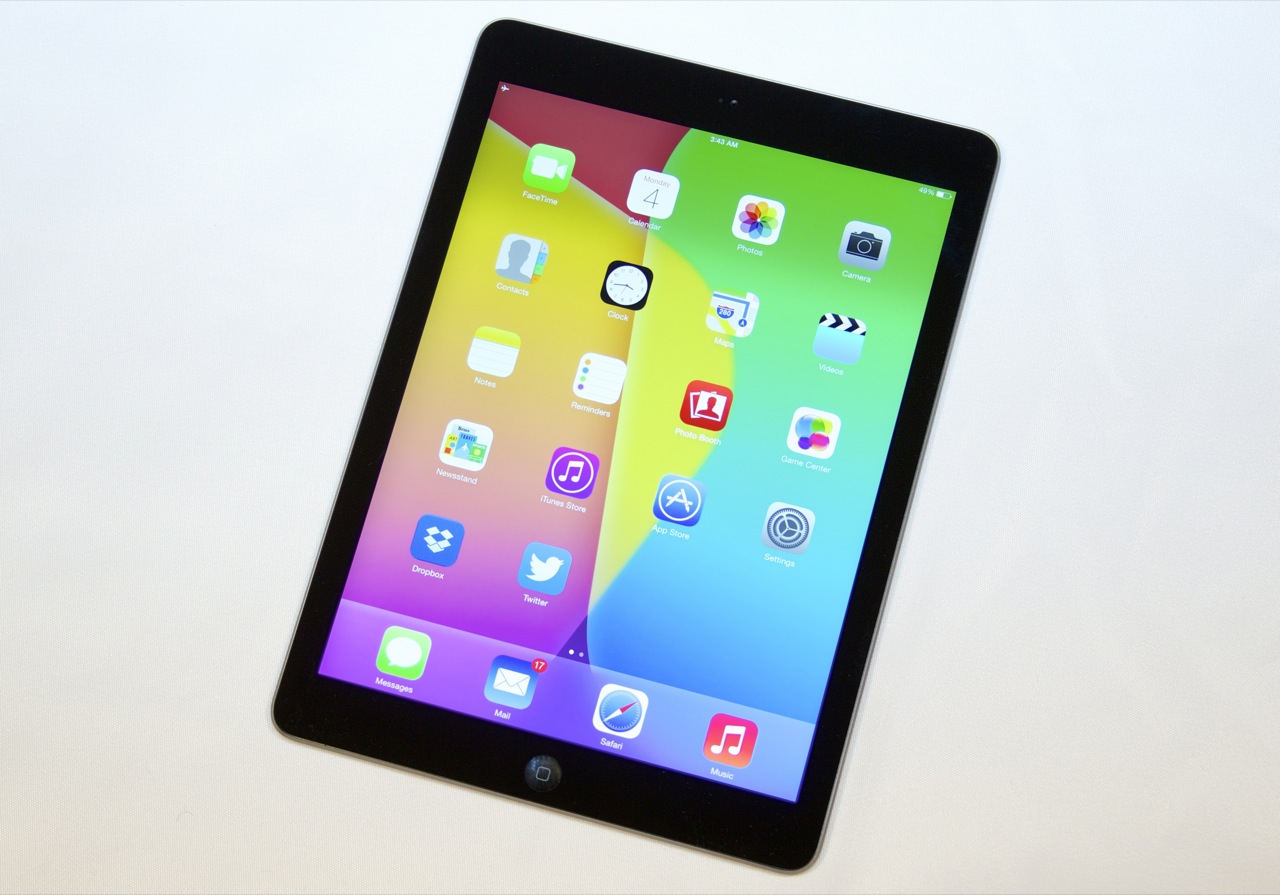
But let's not get ahead of ourselves and give the iPad Air a proper introduction. Easily one of the hottest pieces of hardware we've seen deserves it. Honestly, to say that a diet was all the iPad needed would be a massive understatement - after the iPad 4, which deservedly gets retired. But the way the iPad Air looks is a start made in heaven. The Air is almost 2mm thinner, and has unbelievably lost near a centimeter on each side - it's mostly screen bezel that's gone. The weight difference is the whopping 183 grams. The screen - the same gorgeous 9.7" canvas with 2048 x 1536px resolution.
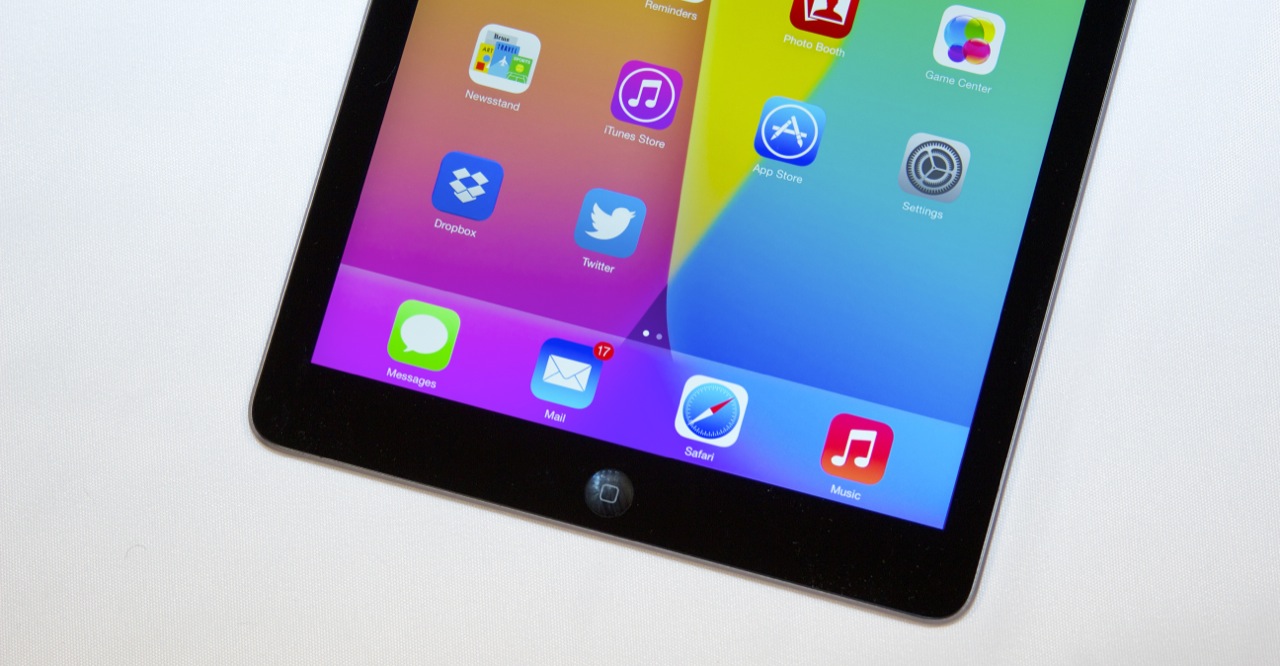
The Air's styling has been updated to bring the full-size iPad into line with Apple's other recent designs: the iPad mini, the iPhone 5 and 5S, and the fifth-generation iPod touch. That means an anodized aluminum body and chamfered edges, as well as boxier (but still curved) corners. It brings a consistency to Apple's high-end iOS lineup that wasn't there in the previous iPad's almost Mac-like design.
Changes aside, the iPad Air is still an iPad. The buttons and ports are in the same places as they were before. It's still a big aluminum-and-glass slab that's mostly screen. The most significant change to the tablet is the first thing we noticed about the iPad Air in our hands-on time with it: its size and weight have been substantially reduced. Moving from 1.44 pounds to one pound makes the tablet easier to hold in one hand for extended periods of time, easy to shake around in landscape mode when you're playing a game, and easier to prop on your chest for some bedtime Netflix viewing.

The Air is a tangible upgrade over the previous, fourth-generation iPad, no longer in production and so banished to the annals of history. The new iPad slots right in where its predecessor left off, priced at $499 for a lowly 16GB, $599 for 32GB, $699 for 64GB, and $799 for the maximum 128GB configuration. Cellular models -- with LTE and support for AT&T, Sprint, T-Mobile, and Verizon in the United States -- cost an additional $130 beyond the above prices.
So, yes, it's still very much the premium-priced choice, just as it's always been. However, the market continues to shift, offering more and increasingly sophisticated alternatives at far cheaper prices, tablets like the Kindle Fire HDX and Google Nexus 10. That, plus strong competition from within Apple's own ranks with the upcoming iPad Mini with Retina Display, means the iPad Air has to be better than ever. Thankfully, it is.

Design
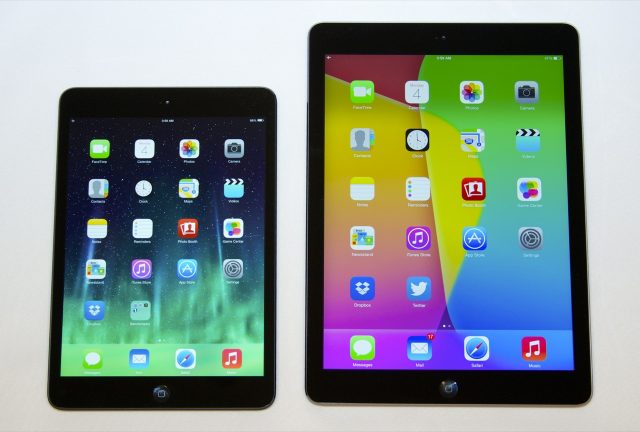
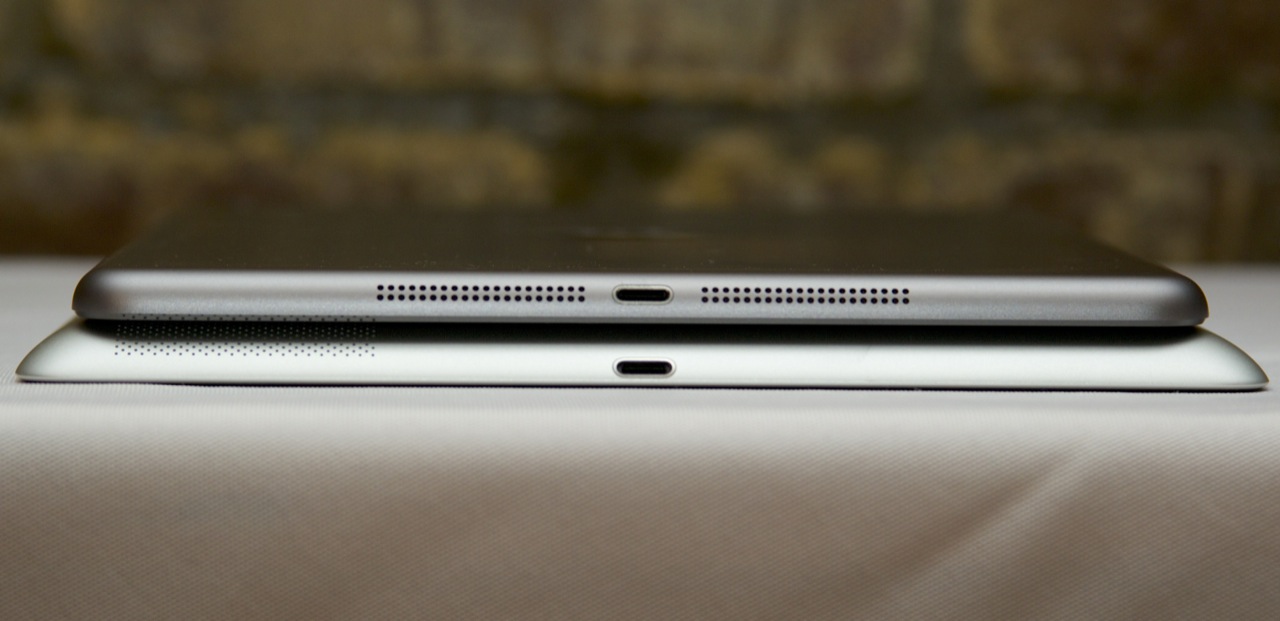
Last year's iPad Mini introduced a fresh new design, taking cues from the latest iPod Touch to create a high-end tablet in an impossibly slender form factor. You could think of the iPad Air as a 20 percent scaled-up version of the Mini, as the two tablets feature near-identical styling details, the bigger one differing only by having more speaker holes on the bottom (80 vs. 56 on the Mini).
 The iPad Air (right) has slimmer bezels than the fourth-generation iPad (left).
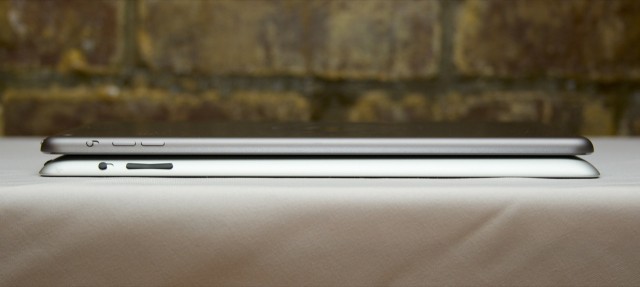
Impressively, though, the iPad Air isn't 20 percent thicker than the Mini. In fact, at 7.5mm, it's only 0.3mm deeper -- a massive 1.9mm thinner than the previous full-size iPad. Despite that, the tablet feels just as sturdy and rigid as before, not flexing a bit even under rather aggressive attempts at twisting.


Josh Miller/CNET
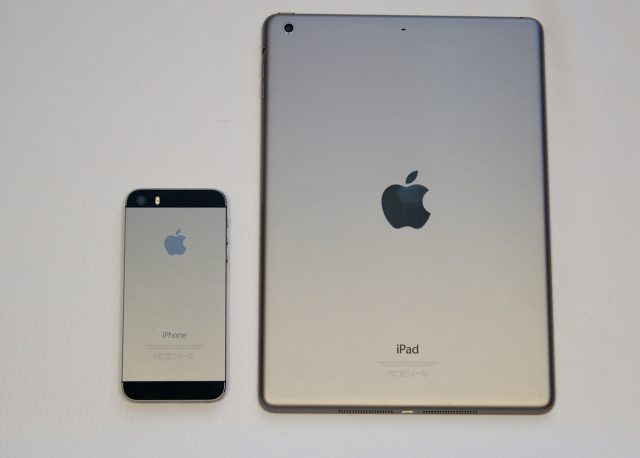
It's light, too, weighing just 1 pound in Wi-Fi-only guise. That's 0.4 pound lighter than the previous generation and 0.3 pound heavier than the Mini. In other words, the iPad Air's weight is actually closer to the Mini than to its fourth-gen predecessor. Indeed, pick up an Air and you'll be reminded of the first time you held a Mini. It's a "wow" moment.  
Our iPad Air (right) is the black fronted, "space gray" backed version, but it also comes in white and silver. The black color used in the iPhone 5 and first-generation iPad mini has been tossed out, possibly to reduce the visibility of scratches and chips.
We were big fans of the Mini last year, and we're big fans of how the Air looks and feels now. The more rounded profile and chamfered edges give it a modern presence, while the new shape means the buttons and toggle switch situated around the upper-right corner are much easier to find than before.

Josh Miller/CNET
Stereo speakers flank the Lightning connector on the bottom, placement that makes them far less likely to be obscured by your hand than the previous-gen iPad's famously mediocre single output. They're also far louder. However, we can't help but wish Apple had positioned the left channel speaker on the top, to allow for proper stereo separation when held in portrait orientation while watching a movie. As it is, you'll hear everything on the right.
Our only other design complaint is the missing Touch ID. This is Apple's term for the fingerprint scanner built into the Home button on the iPhone 5S. It allows you to unlock your device without typing in a numeric code, also making iTunes purchases password-free and, therefore, infinitely less annoying.
The buttons and ports are in the same places as before, and the Air isn't a drastic departure from past iPads. The iPad Air's main draw is that it's much thinner and lighter than the older Retina iPads.

The screen

If you've used a Retina iPad before, you've seen this display already.
Andrew Cunningham
The display itself is more or less identical to the one Apple has used in the first two Retina iPads. It's the same 9.7-inch size, same 2048×1536 resolution, the same 264 PPI density, and the same color, contrast, and brightness. Side by side with our fourth-generation iPad, whites on the iPad Air were a bit warmer, but this kind of variation is normal between tablets based on the manufacturer of the display panel or even different batches of panels from the same manufacturer. The Retina iPads' screens have been eclipsed in the density war by tablets like the Nexus 10 or the latest Galaxy Note 10.1, but the difference between an 264 PPI screen and a 300 PPI screen is largely academic. Text and Retina-optimized apps, icons, and images are all nice and sharp, and the shorter 4:3 aspect ratio makes the tablet usable in portrait and landscape modes where 16:9 and 16:10 tablets this size are better-suited to landscape use.
 Up close with the Retina iPads' 264 PPI screen. You can see individual pixels, but they're very difficult to resolve at normal viewing distances.
Andrew Cunningham
The 300 PPI Nexus 10 up close. The density is a little better, but you're still looking at visible-up-close, invisible-from-a-foot-away pixels, just like on the iPad.
Andrew Cunningham
The only really bad thing about the display is the air gap that Apple has left between the LCD itself and the top layer of glass. This has the side-effect of making the screen easier to repair if that's your thing, but compared to a device with a fused LCD and glass like the iPhone 5S or the Retina MacBook Pro the colors and contrast are a bit more muted. The problem gets worse in direct sunlight, which washes the iPad's screen out more drastically than the iPhone's or the MacBook's.
The difference between a fused screen and an unfused one is more subtle than, say, the difference between a Retina display and a non-Retina display, or the difference between a TN LCD panel and an IPS LCD. Still, given both Apple's push to make the full-size iPad thinner and lighter and the company's push to fuse the LCD and glass layers in its other products, the Air's, um, air gap is puzzling.

Sound

The iPad Air (bottom) has speakers similar to, but slightly better than, the iPad mini.
Andrew Cunningham
They certainly beat the single speaker from the fourth-generation iPad (bottom).
Andrew Cunningham
The iPad Air brings in two sound-related improvements, and they're both about doubling what the Retina iPads had. First, like in the iPad mini, you now have a pair of speakers on the tablet on the bottom edge flanking the Lightning connector. There's still not much bass there, but they produce much clearer and cleaner sound than the fourth-generation iPad, and they're louder and less muffled-sounding than the iPad mini's speakers or the still-pretty-good-for-a-tablet speakers of the 2013 Nexus 7. Edge-mounted speakers continue to be easy to cover up with your hands or whatever surface you're resting the bottom of the tablet on—there's no job that rear- or edge-mounted speakers can do that front-facing speakers couldn't do better.
The iPad Air also gains a second microphone pinhole not far from the first, and like the ones used in most of the Mac lineup it's supposed to cancel out background noise to make for clearer audio. It does seem to help for video chatting, though it doesn't improve voice dictation accuracy much in a room with light ambient noise.

Interface
The iPad Air won't be a surprise to anyone running a current iPhone or iPad, as you've already seen a lot of what iOS 7 is all about.
We're currently updating the iPad Air review with iOS 7.1 - check back in a day or two to see how it changes things and whether the new software will alter the battery and benchmark tests.
We'll run through some of the key features and how they perform on the Air in a moment, but the main thing to know is that the iPad Air is fast. Really fast.
We're getting to a point where describing a smartphone or tablet as quick under the finger is pointless – once you reach a certain point there's not a lot more speed to be gained.
iPad Air review
Even dual-core phones were more than acceptable, so why make a point of highlighting the speed of the new iPad?
Well, it's just virtually flawless through all kinds of tasks. A millisecond faster from a finger press might not seem like much, but once you do a hundred or a thousand of them in a day, and then go back to something like the iPad 3, you'll realise that there's a real difference in the operation.
Our benchmarking scores saw the iPad Air narrowly eclipse the iPhone 5S, also running the 64-bit A7 chip, in terms of overall speed - which makes sense given it's slightly more optimised for the larger screen but still maintains the same power output.
Like it or loathe it, the all-new iOS 7 is still a real step forward for a company that desperately needed to refresh its offering in the face of stiff competition from Android.
The new flatter interface takes away the pointless need to pretend all apps are real-life objects just to integrate them into people's lives - users know that pressing the Photos app will take them there, no matter the result.
Like most popular platforms that get upgraded, there's been a large amount of flack coming Apple's way for iOS 7, with features like the parallax effect (no, there's no way of saying that word without thinking it should be the name of a Marvel supervillain) being turned off by a number of users.
iPad Air review
Parallax is where tilting your iPad will see your wallpaper move with the motion, giving a 3D effect on the screen. And while this was annoyingly unpredictable on the iPhone 5S, on the Air it's much better and we wouldn't advise you turn it off, unlike on other Apple devices.
It doesn't even have a huge effect on battery life, which is impressive in itself.
The rest of the interface is easy to use and makes sense for the most part. One of the newer features of iOS 7 is the notification bar, found by dragging from the top of the tablet. This gives access to updates, calendar entries and missed messages. It's also one of the weaker parts of the OS, as it always starts on the calendar, which doesn't often give a lot of useful information.
The 'Missed' section is often also sparsely populated - we'd rather this prime space was better used by Apple.

However, there are a lot of other areas in which the Cupertino brand has made strides in terms of improving the user experience. For instance, swiping upwards with all five fingers (or double tapping the home button) will lead to the multi-tasking pane, which shows all of your apps in large thumbnails. This is an excellent interface, although perhaps a little large, and you can swiftly jump between apps or flick a thumbnail upwards to end it.
On top of that, the home screen is now updated to allow a much larger number of apps in each folder. Now you can create collections just by dragging icons on top of one another, and continue to do so almost ad nauseum. This prevents the need to make loads of folders called 'Game 1' 'Game 2' and 'Why do I have this many games that I don't play?', and allows a much less cluttered home screen.
Apple still hasn't updated its operating system to allow users to autosort their apps, meaning if you uninstall something (by long-pressing the icon until everything jiggles and then tapping the 'x') then the space won't be filled by an app from another screen. When in the edit mode you can rearrange things, but it's not the most time-efficient way of making everything look neat.

The new Control Center is something worth highlighting too - drag up from the bottom of the screen and you can control music, brightness, turn on Wi-Fi and loads more. We would have thought that most people know all about this feature, but the number of iOS 7 users who get their minds blown when we show them that this exists means it's worth highlighting.
There are tonnes of nuances to Apples UI that we'd like to laud here, but we invite you to go and use it for yourself, as despite there being no tutorial, there's very little here that the novice user won't be able to pick up.
We would like to give a special mention to the 'five finger pinch' if you've not used it before on previous iPads. Make sure it's enabled in Settings->General, and then simply pinch in with four or five fingers in any app to return to the home screen. You'll be doing it on your phone before you know it, such is its simplicity.

Key features

  • 9.7" LED-backlit IPS LCD touchscreen, 1536 x 2048 pixels, ~ 264 ppi; scratch-resistant, oleophobic coating
  • Wi-Fi 802.11 a/b/g/n connectivity with MIMO dual antennas
  • LTE connectivity (data only)
  • GPS with A-GPS and GLONASS support (for the Cellular model only)
  • Dual-core A7 64-bit 1.3 GHz Cyclone (ARM v8-based) chip with M7 motion coprocessor
  • PowerVR G6430 quad-core GPU
  • 1GB of RAM
  • iOS 7.0.3 with iCloud support and activation
  • 16/32/64/128GB of inbuilt storage
  • Lighter at 469 grams (478 grams for the Cellular version)
  • Thinner than ever at 7.5 mm
  • Bluetooth 4.0
  • Lightning USB port
  • Stereo speakers
  • Accelerometer, compass and three-axis gyro-sensor
  • 5MP auto-focus camera
  • 1080p video recording at 30fps
  • 1.2MP 720p secondary camera capable of FaceTime HVGA calls
  • Four and five-finger gestures
  • Comes with premium set of free Apple apps - Pages, Garage Band, etc.

Main disadvantages

  • Non expandable memory
  • Price of storage climbs steeply, and storage is largely overpriced
  • Tied into iTunes for uploading most of the content
  • iOS 7 could've made better use of the bigger screen
  • No standard USB port
  • No GPS receiver in the Wi-Fi-only version
Along with the impressive loss of weight, the iPad Air has really stepped on the optimizations. There is a smaller battery powering the tablet but Apple promises the same 10 hours of battery life as before. The brains behind the tablet are the same as on the iPhone 5s - a class-leading 64-bit dual-core A7 chip that should be twice as fast as the predecessor's. The GPU is even a little more capable than on the iPhone, in keeping with the bigger display and higher resolution.
Apple took a big step in the right direction with this year's iPad lineup by equaling the mini and the Air's specs, so the only thing you need to choose is the screen size that works best for you. This puts the iPad Air in a sticky position, as the mini's handling and portability could be the big decider. The iPad Air, by the way, is now much more comfortable to hold and the narrower casing does wonders for single-handed operation but there's no avoiding the fact that the iPad mini is the friendlier form factor.
Last season's bigger iPad at least had the luxury of being more powerful but those days are gone.
Apple iPad Air Review Apple iPad Air Review
The Apple iPad Air at HQ
Yet, it might turn out in the end that it's the mini that has more to live up to - and prove that it truly is an equal in terms of performance. The iPad Air on the other hand seems off to a promising start. Let's see if it can really keep it up.

New Siri does more, understands new languages

A new iOS version just can't afford to pay no attention to Siri. After more than two years in development the assistant has finally graduated from beta.
Just as the rest of the iOS 7, Siri now looks different. It always launches in full-screen and has a real-time voice graph. Another UI novelty is the option to edit your voice request with the keyboard in case Siri didn't hear you right.
Siri supports and understands English (American, Canadian, Australian, British), French (France, Canada, Switzerland), German (Germany, Switzerland), Japanese, Italian (Italy, Switzerland), Spanish (Mexico, Spain, US), Mandarin (China, Taiwan), Korean, and Cantonese (Hong Kong) languages.
Apple iPad Air Review Apple iPad Air Review Apple iPad Air Review Apple iPad Air Review
The new Siri UI
The most important Siri upgrades, of course, are under the hood. Siri now has Wikipedia integration and it offers new voices, there is both female and male English US for example.
Apple iPad Air Review Apple iPad Air Review Apple iPad Air Review Apple iPad Air Review
Siri in action
Siri can also carry out commands affecting the iOS - it can turn Bluetooth or Wi-Fi on/off, increase brightness, play voicemails, check other people's social network status, play iTunes Radio stations, etc.
Siri is a really powerful voice assistant capable of POI search. Assistance with restaurant booking is part of Siri's set of skills. It will find you exactly the restaurant you are looking for and filter the results based on user reviews. You can run impressively detailed searches based on food type, location, outdoor, pool, price range, ratings, etc. This feature is not available in every country, though.
Siri also answer slots of questions and isn't limited to game scores. History, stats, player bios, player comparison, teams, records, etc. Siri should be able to return most of the info right onto its own screen, without switching over to the browser. The same applies to movies. You will get all of your movie-related answers right inside the Siri window - anything about actors, directors, awards, movie stats, premieres and tickets, reviews, trailers, etc.

Camera
We're still no fans of tablet photography and perhaps Apple agrees it isn't an area worthy of focus, as the (already quite competent) 5-megapixel, rear-facing camera of the iPad Air hasn't changed.
The front-facing, 1.2-megapixel FaceTime HD camera has, however, seen an upgrade, and a noticeable one. Yes, that's the same megapixel count as last year's if you're keeping score at home, but it's a new sensor with backside illumination and bigger pixels. The result is far better low-light performance, which is important if you don't want to look like you're FaceTiming from a dungeon.

Josh Miller/CNET
Connectivity
With the iPad Air, Apple has stepped up to a dual-antenna configuration for Wi-Fi. Called MIMO (multiple-input, multiple-output), it theoretically doubles the maximum throughput of data able to be transmitted to or from your tablet, up to 300Mbps with a compatible router. This is far from new (Amazon's second-generation Kindle Fire offered the same last year), but its presence is certainly welcome here.
However, the absence of 802.11ac is disappointing. Like the iPhone 5S, the latest iPad tops out at 802.11n. Given the lack of adoption elsewhere in Apple's lineup, it's not surprising to see ac missing here, and the relative lack of compatible routers and access points means there's little demand for it now. However, those still using their Airs a few years down the road may find themselves wishing Apple had found room for it this time around.
Josh Miller/CNET
Those who pay $130 more than the Wi-Fi-only models will have full cellular connectivity built in, including a comprehensive swath of bands and frequencies. Whether you're connecting over EDGE, HSPA+, CDMA, or LTE, the iPad Air has you covered. And, since there's just one Air model worldwide, you can change from carrier to carrier on a whim and rest assured that, regardless of where you travel, you'll be able to get connected. Assuming they have nano-SIMs available.
Finally, all iPad Air models include Bluetooth 4.0 connectivity, just like they did last year. This means you can quickly and easily connect everything from keyboards to speakers, and do so without killing your battery life. 

Hands On Photo

Source
Engadget Apple iPad Air Reviews (Critic Reviews 8.9/10, User Reviews 9.4/10)
GSM Arena Apple iPad Air Reviews (Design 6.5/10, Features 6.2/10, Performance 6.5/10)
Techradar Apple iPad Air Reviews (Design 5/5, Features 4.5/5, Performance 5/5, Usability 5/5, Value 4.5/5)
Ars Technica Apple iPad Air Reviews (8/10)

The good

  • Thinner, smaller, and lighter body makes for a much more usable 10-inch tablet
  • The A7's CPU performance continues to impress, delivering on Apple's claims of doubled performance
  • Retina display, while unchanged, is still crisp and bright
  • Great battery life and reduced charge times
  • Improved sound input and output thanks to the dual mics and speakers
  • Better Wi-Fi performance, even if it isn't 802.11ac
  • Cost is more or less competitive with other tablets in its size and performance class
  • iOS 7's extensive tablet app and media ecosystems are difficult to argue with

The bad

  • The GPU can rarely actually double the performance of the A6X, counter to Apple's claims
  • 16GB of storage is getting to be a bit small for an entry-level iPad, especially once you've downloaded all your free iLife and iWork apps
  • Air gap between glass and LCD panel might be good for repairability, but it makes for inferior color, contrast, and outdoor visibility
  • Whither Touch ID?

The ugly

  • 1GB of RAM may prove to be a liability, especially as 64-bit apps become more common
CNET Apple iPad Air Review (CNET Editor's Rating 4.5/5, Average User Rating 4.5/5)
The Good The iPad Air delivers more performance and comparable battery life in an attractive and impossibly thin-and-light package. An improved front-facing camera makes FaceTiming look better, and the Retina Display still looks great.
The Bad The Touch ID fingerprint scanner, introduced on the iPhone 5S, is sadly absent here, meaning you’ll still have to type in a passcode with every unlock and a password with every purchase. Starting at $499 for 16GB, it’s still expensive compared with the competition.
The Bottom Line Functionally, the iPad Air is nearly identical to last year’s model, offering only faster performance and better video chatting. But factor in design and aesthetics, and the iPad Air is on another planet. It’s the best full-size consumer tablet on the market.

Where to Buy

 
© 2012. Design by Main-Blogger - Blogger Template and Blogging Stuff