The 17-inch laptop is a unicorn these days. But in the
gaming world, the arguably huge form factor is alive and well. Alienware
has doubled down on its colossal clamshell, simply known as the
Alienware 17, with an AMD-powered variant.
With an AMD
Radeon HD R9 M290X pushing the pixels behind its 1920 x 1080 anti-glare
screen, this version of Dell-owned Alienware's notebook comes in $350
(about £207, AU$373) cheaper than its Nvidia-toting counterpart. Given
that AMD's latest mobile GPU houses twice as much video RAM – 4GB to the
GeForce GTX 860M's 2GB – that's not a bad deal at all.
Aside from that, nothing about the Alienware 17 has changed, including its gigantic frame. Both the MSI GS70 Stealth and Asus G750JX are thinner and cheaper, but fall on different ends of the spectrum in terms of hardware, design and overall focus.
[Editor's
note: Since I have yet to test the latest Nvidia GeForce GTX 800M
series versions of either of these Asus and MSI machines, I will
continue to compare the Alienware 17 to the 700M series editions of
these products. This review may be updated after testing MSI, Asus and
even Alienware's most current Nvidia-equipped products.]
More subdued, but still a sore thumb at the coffee shop
Design
If you're familiar with Alienware's latest design ID, then none of this will be a shock. But for those coming from the Alienware M17x 2012 perhaps, plenty has changed. The pronounced curvature of the old has given in to a more angular silhouette throughout.
Not
only did that make more custom lighting zones a possibility, but it
allowed for an all-aluminum lid and magnesium alloy base. This grants
the Alienware 17 an even more premium look and feel than before, one
that's slightly more subdued – a much welcome change, frankly.
Alienware
says that these and other revisions have increased the system's weight
in metal materials considerably, while overall the unit comes in nearly
0.25 pounds lighter. Regardless, this is still a notebook that warrants
its own line of custom-made backpacks and shoulder bags.
It looks as if it could take off at a moment's notice
The
keyboard and its lighting received a welcome change as well, moving on
from chiclet keys to a more mechanical, switch-based board sitting on an
aluminum plate. And in place of the garish, front-facing speaker
lights, the entire base is now wrapped in slim, sleek strips of light.
Plus, the entire touchpad now illuminates – not just its border.
Flaunting it with AlienFX
Unique
to Alienware's laptops is the wide variety of lights that line their
chassis and illuminate their keyboards. The company calls this AlienFX,
and it returns in full form on the Alienware 17 with incredibly deep
customization, thanks to an app of the same name.
AlienFX
allows for specific color profiles for each zone of lighting. For
instance, if you wanted the Alienware logo and strips of light on the
lid in a crimson red, with the lights lining the base shining a cool
blue, there's nothing stopping you. Furthermore, four zones of the
keyboard can be illuminated in different hues. (And that's not even
close to all.)
See? Those cooling vents could easily double as thrusters
Digging
even deeper, the Alienware 17's lighting scheme can cycle through
multiple themes at a certain tempo. And, through the AlienAdrenaline
tool, you can create special themes for different games and apps.
The
options are nigh limitless, and aesthetically set the Alienware apart
from the lot of boutique gaming laptops. More importantly, AlienFX
brings a bit of the custom flair of gaming PCs to laptops. Now, let's
see what else about the PC gaming experience Alienware manages to
emulate.
Spesifications
Save for the latest and greatest mobile GPU from AMD, there
is nothing different between this version of the Alienware 17 and its
Nvidia-toting counterparts. So, its bag-bulging dimensions and weight
should surprise exactly no one.
You're looking at one
beast of a mobile gaming rig here, measuring 16.3 x 11.8 x 1.8 1.9
inches (W x D x H) and weighing a hefty 9.15 pounds. The Asus G750JX comes in at an equally wide (but thinner) 16.15 x 12.5 x 0.66 1.9 inches, but tips the scale at 10.5 pounds. Naturally, the MSI GS70 Stealth is the slimmest of the bunch, at 16.5 x 11.3 x 0.85 inches and 5.7 pounds.
Keep
in mind that the MSI model lacks the Blu-ray drive found in both the
Alienware and Asus units. But lets see what Alienware manages to squeeze
into such a bulky 17.3-inch laptop, compared with the slightly slimmer
competition. This is the Alienware 17 configuration sent to TechRadar:
Spec sheet
CPU: 2.4GHz Intel Core i7-4700MQ (quad-core, 6MB cache, up to 3.4GHz with Turbo Boost)
Graphics: AMD Radeon HD R9 M290X (4GB GDDR5 RAM); Intel HD Graphics 4600
RAM: 16GB DDR3L (2x 8GB at 1600MHz)
Screen: 17.3-inch, 1920 x 1080 WLED, Anti-Glare Display
Storage: 256GB mSATA SSD; 1TB HDD at 5400 rpm
Optical drive: Slot-loading, Blu-ray reader (9.5mm, dual layer)
Ports:
4 USB 3.0 ports (one with PowerShare), HDMI 1.4 (1.3 input), RJ-45
Ethernet, mini-Display Port, 2 ⅛-inch audio out ports (one compatible
with inline mic headset), ⅛-inch line-in Microphone port (available for
5.1 analog audio output), Kensington security lock slot
Connectivity: Broadcom 4352 802.11ac Wi-Fi; Bluetooth 4.0
Camera: FHD, 2-MP webcam
Weight: 9.15 pounds
Size: 16.3 x 11.8 x 1.8 1.9 inches (W x D x H)
This
is just about the base configuration available for the AMD variant of
the Alienware 17, and it calls for a steep $2,449 (about £1,457,
AU$2,644). That might seem like a borderline insane amount of cash to
drop even on a product this jam-packed with high-end hardware, but
consider what else you're paying for. (You can swap in a 500GB, 5400 rpm
hard drive with an 8GB solid-state cache to knock the price down to a
base $2,149, or about £1,279, AU$2,320.)
Alienware crafts
one of the most premium builds in the gaming laptop world, and offers
one year of phone support – plus in-home servicing – for its machines.
Asus supplies a year of 24/7 phone support, whereas MSI provides neither
(though, it does throw you a 2-year warranty).
The most photogenic laptop ever? It's damn close, at least
Both
the GS70 Stealth and G750JX are Nvidia-based systems, but since AMD
isn't terribly common in the mobile PC gaming world, I'll have to make
due. (Plus, it makes for an interesting comparison.) First up is Asus,
which can sport comparable components for $2,274 (about £1,353,
AU$2,455) – or $175 less than this Alienware 17 – on Amazon.
That
gets you a near-identical 2.4GHz Intel Core i7-4700HQ chip, a whopping
24GB of RAM and a similar 128GB SSD coupled with a 1TB mechanical drive
alongside an Nvidia GeForce GTX 780M with 4GB of video memory behind an
FHD panel. This setup also nets you a Blu-ray drive for parity with the
Alienware at hand, but you're also stuck with Windows 8.1. (Alienware offers the choice of either Windows 7 or 8.1; this unit came running the former.)
As
for MSI, a similarly configured GS70 Stealth – also available on Amazon
– goes for even less at $1,805 (around £1,074, AU$1,948). That price
nets the exact CPU found in this Alienware, 16GB of RAM, a lower-power
GeForce GTX 765M with 2GB of video RAM, and a similar 256GB SSD (two
128GB units in RAID) and 1TB, 7200 rpm HDD combo. This is all behind an
FHD screen as well, but again, no Windows 7 option. What
the Alienware 17 has above both of these systems is 802.11ac
networking, which could prove vital in the coming years, especially in
online gaming. But let's see how well this Alienware fares pushing the
present's pixels first.
Performance
One reason folks buy Alienware is guaranteed premium
performance, and this AMD variant generally delivers on the pedigree
(but not without a few hurdles). The synthetic tests we run on gaming
laptops say as much, and so do the games. Here's how it fared:
Benchmarks
3DMark: Ice Storm: 89,348; Cloud Gate: 17,444; Fire Strike: 4,727
As
you can see, the AMD R9 M290X in this rig just about destroys 3DMark
Fire Strike, not to mention its rival gaming laptops. The Asus G750JX scored a meager 3,123 points in comparison, while the MSI GS70 Stealth fared even worse at 2,211.
Like a suit of Awesome +1 armor
As
for the games, the machine trounced the best of Bioshock Infinite at a
smooth 47 frames per second on average, while the GS70's GTX 760M
clocked a still-playable 42 fps. However, Metro: Last Light brought this
Alienware to its knees – a reality check for those hoping for top- tier
performance from a mobile GPU. (The Asus model was not tested on either
game.)
Don't bother bemoaning the battery
Discussing
the battery in a 17-inch gaming rig is almost moot, but the
power-friendly Haswell chip inside did all it could to keep this monster
alive. In my own test, the Alienware lasted a bit longer than on PCMark
8: 3 hours and 6 minutes. That was on the "Balanced" Windows power
setting with the AlienFX lighting turned on, the volume at 10% and
screen brightness at 50%. That also included streaming high bitrate
audio via Spotify, running Google Chrome with 10 to 15 tabs, a
heavyweight chat app and TweetDeck.
Cutting the lights
and dimming the screen even further could eke out another 30 minutes or
so, maybe, but that's not the point. The Alienware 17 wasn't designed to
follow you from outlet to outlet, but rather for raw performance. (The
included power brick weighs a pound or two on its own for a reason.)
The power light changes color to indicate charge level
Don't
even bother trying to game on this laptop while on its battery. AMD's
Enduro graphics switching technology will instantly turn the graphics
chip off in favor the integrated Intel GPU, anyway. Speaking of which,
how does AMD's latest handle, say, the Call of Duty makers' latest?
Driving me up a wall
There
is one area in which Nvidia is clearly far ahead of AMD: drivers.
Updating drivers on an Nvidia GPU, whether it's a mobile or desktop
chip, happens with a single button press through the company's GeForce
Experience app.
Given that Alienware equipped this laptop
with AMD's best yet, naturally I fired up the latest major PC shooter,
Titanfall. It was immediately noticeable that performance wasn't nearly
where it should be for a graphics chip this powerful, even for mobile. So,
I attempted to update the driver through AMD's Driver Autodetect tool,
which mistook the Radeon HD R9 M290X for the Radeon HD 8970M and
overwrote the driver with an incorrect version. This led to a host of
performance and detection issues that eventually forced me to reinstall
the graphics adapter entirely.
The confusion is somewhat
understandable, considering the only difference between these two GPUs
is that the M290X packs double the video RAM. Nevertheless, AMD has
plenty of work to do in simplifying this process for players.
Performance to match the panache?
After
the dust settled on the driver debacle, the R9 M290X more than lived up
to its $2,000-plus asking price as I stomped through the war torn
streets of Titanfall. However, this was only after settling some nasty
switchable graphics issues. I've
found that AMD's Enduro graphics switching requires some serious
massaging, from flagging games in AMD's Catalyst Control Center (to
guarantee that the GPU is active during play) to restarting to system.
You know, just to make sure things are really in order – and it works.
While
using FRAPS to read frame rates, I locked Titanfall's texture settings
to "high" at 1920 x 1080 resolution, with vertical sync and 2x
anti-aliasing enabled. The result was me staring down the boots of
various robots at a buttery smooth 60 frames per second. Only in
particularly chaotic scenes did the frame rate drop to 45 fps, but I'll
take it.
As for MMOs with vast vistas and deep draw
distances, World of Warcraft and Final Fantasy XIV ran at a silky 60 fps
at high to maxed detail settings. With marquee shooters like Destiny on
the horizon, this Alienware 17 should be able to keep up, so long as
AMD gets Enduro in order.
BYOK (Bring Your Own Keyboard … and mouse)
The
Alienware 17 keyboard, closer to the mechanical gaming keyboards of old
than the membrane keys found on most laptops, offers near-perfect
travel and spacing. However, typing on a surface raised nearly an inch
off the desk was a struggle, especially in games that rely heavily on
the WASD keys.
Come for the mechanical feel, leave for the cramp-inducing height
My
fingers and wrist quickly cramped while conquering the dungeons of
Azeroth, if only due to the extra height I had to lift my arm to reach
the number keys. If your desk is tailored to typing at a certain height,
put the Alienware 17 on a stand and pick up a gaming keyboard.
And
while the backlit touchpad offers smooth scrolling and tracking
throughout Windows 7, it's nothing to game on. That said, with
comfortable, soft-touch palm rests, this keyboard should serve you well
in a pinch. Plus, the lighting is simply brilliant.
Bundled software
Alienware
is visibly aware of the stigma against bloatware, and as result only
includes its own proprietary software. Collectively known as the
Alienware Command Center, this suite of apps controls all of the
system's unique features:
AlienFX: Control
all of the lighting zones on the unit, giving each a unique hue and
intensity. It's all done through intuitive color wheels for simplicity.
AlienTouch:
Tweak the Alienware 17 touchpad's sensitivity and other features. You
can disable the touchpad automatically upon using a mouse too, though I
had trouble getting the touchpad to turn back on after resuming from
sleep.
AlienFusion: Here, you can adjust how
certain components, like the GPU and Wi-Fi adapter, behave under certain
conditions or when running certain apps.
AlienAdrenaline:
Temporarily get rid of extraneous Windows processes in one step upon
launching a game with this tool, though the effect on performance is
minimal.
Alienware TactX: Here is where users
can program the four dedicated macro keys on the Alienware 17 keyboard.
Users can also share profiles tailored to specific games.
Apple's often imitated but never bettered ultra-portable
laptop puts in a strong, though not faultless, performance with this
mid-2013 release, the sixth-generation of the MacBook Air.
It
offers significant improvements in its solid state storage speed,
graphical power, battery life and wireless capabilities, but the
processor's clock speeds actually take a backward step. But as we'll
see, for most real-world applications, the MacBook Air 2013 matches or
out-performs its predecessor.
Like most recent MacBook Air refreshes, the mid-2013 update
brings us four new models; two with 11-inch screens and two with 13-inch
displays. All use Haswell 1.3GHz Intel Core i5 dual-core processors,
replete with Intel HD Graphics 5000, the latest version of Intel's
integrated graphics chipset. They also all run the OS X 10.8 Mountain Lion operating system, although this will change to OS X Mavericks when available.
The
cheaper model in each of the two screen sizes has 128GB of solid state
storage, the more expensive version has 256GB, and all offer 4GB of RAM.
The
version on test here is the top-of-the-range 256GB 13-inch MacBook Air,
which costs £1,129 / US$1,299 / AU$1,449. The lower specced 128GB
13-inch model is £949 / US$1,099 / AU$1,249.
If your budget won't stretch that far - or if you just want a smaller model - the 11-inch MacBook Airs are priced at £849 / US$999 / AU$1,099 for the 128GB version and £1,029 / US$1,199 / AU$1,349 for 256GB of storage.
While the quality of the MacBook Air isn't in question, not
everyone is prepared to pay so much for a light, carry-around notebook.
For those on a budget, Chromebooks offer good value for money, as long as they meet your needs.
Eschewing OS X, Windows and Linux for Chrome OS, these run web-based applications and can be bought very cheaply. For example, the Samsung Chromebook cost just £230 / US$330 / AU$320 at launch.
More expensive Chrome-powered notebooks are available too, though. Google's own Chromebook Pixel
is a gorgeous high-end notebook costing £1,050 / US$1,300, which is
more than either of the two 11-inch MacBook Airs in the mid-2013
refresh, but it proves cloud computers can be as stylish and desirable
as an Apple notebook.
If you want a Windows 8 ultra-portable notebook, the Samsung Series 9 NP900X3D
has an Intel Core i5 processor, a 13-inch screen and 128GB of flash
storage like this MacBook Air. If you prefer Windows to OS X, the Lenovo ThinkPad X1 Carbon Touch is one of the thinnest and lightest Windows 8 netbooks on the market, and a very credible alternative to the MacBook Air. People
who want a Mac but need a lot of processing power, such as video
editors, gamers and graphic artists, might be better off with a MacBook Pro or an iMac. But the MacBook Air is fine for everyday computing, and perfect for business travellers and regular commuters.
We've previously tested Haswell chips in a few laptops and been impressed by both the
performance and battery life gains (to be realistic, the latter is much
more important for consumers). If you add Haswell to Apple's
already-stellar battery life reputation, you get a system, in the
13-inch Air, that Apple claims will run for up to 12 hours, and in our
tests (spoiler alert) ran even longer.
Sarah Tew/CNET
Having
a Haswell-generation CPU also gives you Intel's improved HD5000
graphics, which promises improved game performance over last year's
HD4000 graphics (itself an improvement over the preceding HD3000, and so
on). It's still not anything like having a discrete GPU, as in the 15-inch Retina Pro, but with game services such as Steam and EA's Origin now being Mac-compatible, it may make some small inroads for OS X gaming.
Also new is 802.11ac Wi-Fi, a new standard that will eventually be found in wireless routers, as well as Apple's new AirPort Extreme and AirPort Time Capsule hardware. If you have an 802.11n router, which is a
much more likely scenario, this may not help you, but it's a nice piece
of future-proofing. Apple also says the solid-state-drive storage
included in the Air laptops is now faster, although I think bumping the
base $999 11-inch model
up to a full 128GB of SSD storage (from the paltry 64GB previously sold
at that same price) is a much more important development.
Sarah Tew/CNET
It's easy to say that this new version of the 13-inch MacBook Air is a
modest step forward, with no physical changes to the exterior, and still
no higher-res display, touch screen, or HDMI port. The battery life is a
very big deal, however, and when you couple that with a $100 price cut
on the base model, down to $1,099, the 13-inch MacBook Air is, despite
not being the newest design on the block, still one of the most
universally useful laptops you can buy.
Design and features The MacBook Air keeps
the same external look as the previous couple of generations, a look
that still rivals the newest ultrabooks, although some new systems, such
as Sony's Vaio Pro line, are getting thinner and lighter without sacrificing much in the way of productivity.
Both the 11-inch and 13-inch versions of the MacBook Air still have the
same thickness, ranging from 0.11-inch to 0.68-inch. Spread over the
larger footprint of the 13-inch chassis, the 13-inch version still feels
satisfyingly thin.
The Vaio Pro 13 next to the 13-inch MacBook Air.
Sarah Tew/CNET
As
with the previous version, the rigid aluminum construction makes the
Air feel sturdy enough to just throw it in a bag and carry along with
you without a protective case or sleeve, and it's interesting to
contrast the aluminum unibody construction here with the lighter carbon
fiber in the aforementioned Vaio Pro. I'd still trust the Air and its
unyielding lid more in a throw-in-your-luggage field test.
The
backlit keyboard and trackpad are the same as on the previous models,
and the trackpad especially remains the standard by which all others are
judged. Many other laptop makers have moved to larger clickpad-style
touch pads, but we have yet to find a touch pad that comes close to this
for multitouch gestures. The pad is again hinged at the top, allowing
the entire pad to click down, and we strongly suggest going into the
Preferences menu and turning on all of the tapping options for further
ease of use.
It
will be interesting to see how Apple's user interfaces develop in the
face of both Windows 8, which tries (not terribly successfully) to
reinvent the entire concept of working with a computer OS, and the
upcoming OS X Mavericks update. For now, flicking around with three-and-four-finger
gestures on the MacBook trackpad remains the most seamless way to swap
between windows and applications, at least in my experience.
Unlike on the 11-inch MacBook Air, the 13-inch screen is still not a
16:9 display. The screen area also lacks the edge-to-edge glass over a
black bezel found in the MacBook Pro; instead the screen is, as in previous years, surrounded by a thick silver bezel.
On the positive side, the native resolution of the display is
1,440x900 pixels, which is better than the 1,366x768 you find in many
13-inch laptops, although even midpriced models are quickly switching
over to 1,600x900 or even 1,920x1,080. Of course the Retina Pro models,
along with a handful of laptops from Toshiba, HP, and Dell, are
experimenting with even-higher-than-HD resolutions.
While
the Air screen isn't flat matte, it's also not terribly reflective,
which is a step up from the "mirror image" effect you get on some laptop
screens.
Apple MacBook Air (13-inch, June 2013)
Video
DisplayPort/Thunderbolt
Audio
Stereo speakers, headphone jack
Data
2 USB 3.0, SD card reader
Networking
802.11ac Wi-Fi, Bluetooth
Optical drive
None
Connections, performance, and battery The
ports and connections remain unchanged on this version of the MacBook
Air. That gives you two USB 3.0 ports and a Thunderbolt port to play
with, with the latter used for both external accessory and video
connectivity. The faster 802.11ac Wi-Fi will play nice with Apple's own
upcoming new AirPort Extreme and AirPort Time Capsule hardware, but I
suspect you're still working off an 802.11n router. There's more on what 802.11ac means for you here.
Sarah Tew/CNET
The base configuration for the 13-inch Air now costs $1,099, versus
$1,199 previously. Most of the system is unchanged, with the main
difference being the new Haswell-generation Intel processor and
platform. Interestingly, last year's base model CPU was a 1.8GHz
dual-core Intel Core i5, while the newer Haswell version is a 1.3GHz
Intel Core i5-4250U. The step-up $1,299 configuration keeps the same CPU
as the $1,099 one, but doubles the SSD to 256GB. Benchmarks Xbench: 357.50 Cinebench 10 Single core: 4242 Cinebench 10 Multi-core: 8636 iTunes encoding (USB SuperDrive): 452 seconds Movie encoding (iMovie): 242.6 seconds Doom 3: 68.9fps Call of Duty 4: 67.8fps Battery: 9 hours Novabench, Total: 589 Novabench, Graphics: 44
Although
the processors have a slower clock speed than the previous generation,
across-the-board performance improvements mostly make up the difference.
The faster graphics enjoyed by the Haswell processors meant that in our Call of Duty 4
test, the 2013 13-inch MacBook Air ran the game at 67.8 frames per
second, compared to 59.5fps for the 13-inch, 1.8GHz dual core Intel Core
i5 model from 2012.
Battery life is where the new MacBook Air (both the 11-inch and
13-inch versions) really stands out. The previous-generation 13-inch Air
ran for 7 hours and 27 minutes in our video playback battery drain
test. The 2013 version blows that out of the water, with an astonishing
14 hours and 25 minutes on the same test. That's better than Apple's
estimate of 12 hours, and one of the only times our tests have indicated
longer battery life than a manufacturer's claims.
Now,
before we get too excited, there are a few caveats for that number. Much
of the credit must got to Intel's fourth-generation Core i-series
platform, which was pitched as being incredibly power-efficient. Our
early tests confirm this, with the new 13-inch Sony Vaio Pro 13 running
for nearly 9 hours. And, while this is a much better score than last
year's Air, the CPU itself runs at a lower clock speed, and the new
Intel chips are especially optimized for video playback, which is the
heart of our battery test. Using Wi-Fi and Bluetooth heavily or playing
3D games would cause that number to drop.
But even keeping
those factors in mind, Apple's typically stellar battery achievements
and Intel's new Haswell chips have combined to make this a truly all-day
laptop.
The GoodNew Intel fourth-gen CPUs help the updated MacBook Air
achieve amazing battery life. The multitouch trackpad is still the
industry's best, and even better, the 13-inch MacBook Air now starts at
$100 less than the previous model.
The BadNewer
features such as touch screens and higher-resolution displays are still
missing. The ultrabook competition is catching up, in terms of design.
The Bottom LineApple
keeps the latest MacBook Air updates on the inside, but greatly
improved battery life and a lower starting price make up for a lack of
flashy design changes.
The Thinkpad Ultrabook Gets a High-End Windows 8 Touch
High performance laptops are nothing new, but until recently
they were hulking beasts that could break one's back if carried out of
the house. Things have changed - it's now possible to have top
performance in ultra-portable packages, as demonstrated by the Lenovo
ThinkPad X1 Carbon Touch Ultrabook.
It's hard to classify the Lenovo's direct competitors due to the huge variety of Windows 8
hybrids and laptops on the market. The rulebook has been ripped up and
with a traditional laptop design with an added touchscreen, the Lenovo
ThinkPad X1 Carbon Touch is one of the more conservative offerings. High
performance laptop hybrids such as the Sony Vaio Duo 13 spring to mind, as do traditional Ultrabooks such as the Dell XPS 13 and MacBook Pro with Retina display.
The original 2012 Lenovo X1 Carbon was the best ThinkPad money could buy, but now Lenovo has added a touchscreen panel and changed Windows 7 Professional for Windows 8, bringing last year's model right up to date.
The
result is a formidable machine that not only offers the best usability
and performance, but also a fantastic Windows 8 experience. However, the
eye-watering price tag of £1,779 / US$2,139 / AU$2,538 means this
experience doesn't come cheap.
Pick the Lenovo ThinkPad
X1 Carbon Touch up and it's immediately apparent that you're holding a
different class of laptop. ThinkPad has always been a predominately
business brand and you'll have seen the familiar black matt chassis
punctuated by that red mouse pointer in Starbucks and train stations all
over the place.
Being a ThinkPad, the X1 Carbon Touch
retains the looks synonymous with this illustrious range, but the
similarities with bog-standard corporate machines end there. Yes there's
the red mouse nipple, which is bemusing when a touchscreen and
full-sized trackpad are on offer, but it's an example of how important
the look of the X1 Carbon Touch is to Lenovo.
However,
when you pick up the Lenovo ThinkPad X1 Carbon Touch for the first
time, the solid, flexless build, smooth rubberised finish and
lightweight chassis can't fail to impress. The fact that this machine
weighs just 1.5kg (3.3lbs) yet counts as one of the most powerful
Ultrabooks on the market speaks volumes about what Lenovo has achieved.
Other
Ultrabooks that have tried to achieve this balance of weight and power
have ended up scrimping on build quality - such as the HP Envy 15 with its awful trackpad or the Acer Aspire S7 and its keyboard, but the Carbon oozes quality from every port.
From
the beautifully spaced and comfortable keyboard that enables immediate,
accurate speed typing to the smooth and responsive trackpad to the
luxurious panel that manages to marry vibrancy and clarity with a
non-reflective finish.
Windows 8 review
It's
not just the weight - or lack of - that makes the Lenovo ThinkPad X1
Carbon Touch such a engineering triumph, it's also the thickness.
Despite measuring 22mm (0.87 inches) at its thickest point - a not
exactly size-zero waistline - the Carbon's wedge shape gives it the
impression of blade-like thinness. It's alluring to look at and commands
attention, attracting admiring comments from those around you.
However,
to ace a TechRadar review, you need more than alluring looks. So let's
get under the hood and see how good the Lenovo ThinkPad X1 Carbon Touch
really is.
The expected ThinkPad amenities are standard, including vPro
management, TPM, a fingerprint reader, and even an optional integrated
WWAN (3G) radio. The carbon fiber cover and cage are, in Lenovo’s
parlance, “satellite quality,” and the chassis certainly feels more
durable than Sputnik.
Lenovo also hasn’t forgotten about the things that users actually
care about. Audio is impressive and Dolby-certified. The keyboard is
backlit and fully usable, and the glass touchpad was rock solid on this
go-round with the Carbon. (The 2012 unit I tested had a disturbingly loose one.)
Only two complaints marred my experience with the X1 Touch. Foremost
is battery life. While I managed to score an extra half hour of video
playback versus the old X1, at 3.5 hours of running time, it is still at
the bottom of the heap of Windows 8 laptops when it comes to longevity.
The screen is also relatively dim, and colors look a bit washed out in
comparison to other recent-model laptops.
Of course, there’s also the not-insubstantial price to consider, too.
The X1 Touch starts at $1,350 and, as configured, runs a hefty $1,729.
That’s cheaper than the non-touch Carbon I reviewed in the fall, but
still a huge investment in a laptop, and hundreds of dollars more
expensive than the competition in this space. (Acer’s 14-inch Aspire M may be heavier, but it’s less than half the price.)
If you’re trying to convince your boss to buy one for you, my recommendation is lean heavily on the bit about the satellite.
WIREDExcellent combination of performance,
portability, and durability. Still the best keyboard going. Trackpad
issues resolved. You want bells and whistles?
TIREDProbably the most expensive computer in its
class. Screen not as impressive as the previous generation. Battery life
upgraded, but still not enough.
Specifications
Under the hood is an Intel Core i7
processor 3667U, the U in that pithy moniker indicating that it's one of
the ultra low-power chips designed for Ultrabooks. It packs
considerably more power than the likes of the Asus Zenbook or Samsung Series 9, since it's clocked at an impressive 2GHz.
The
benchmark scores from our lab tests back this up too, with a top-end
performance resulting in roughly 10 per cent more power than rival
Ultrabooks such as the Asus Zenbook.
The
Core i7 chip is also left to handle the graphics tasks in the absence
of a dedicated graphics card. It has become the norm for manufacturers
to leave 3D graphics to the onboard processor now, but it means that
despite the sky-high price tag, the Lenovo ThinkPad Carbon X1 isn't the
best choice for heavy video editors or gamers.
Elsewhere there's a whopping 8GB of RAM, an amount normally reserved for gaming machines or high-end powerhouses such as the Samsung Series 7 Chronos. This helps keep the Lenovo ThinkPad X1 Carbon Touch noticeably quick, helping a slick, breathless performance.
There
are several models of the Lenovo ThinkPad X1 Carbon Touch at a range of
price points, and our model packed a 256GB SSD drive, the highest you
can get. The only criticism here is the lack of usable space, and of the
256GB on offer, only 190GB was usable.
Looking
at the frankly ludicrous price tag, one might be forgiven for
mistakenly thinking that a dedicated graphics chip powered the Lenovo
ThinkPad X1 Carbon Touch, but in a laptop this thin all the
pixel-pushing has been left to that Intel Core i7 processor. It does a
good job and performs better than most Ultrabooks, meaning that even the
latest games are within its limitations, if you don't mind sacrificing
some graphics performance.
Of course, the 14-inch, 1600 x
900 resolution panel is a key part of this updated Lenovo ThinkPad X1
Carbon Touch, and while we'd like to have seen 1080p included given the
price, it's still a good performance.
The colours look
great, it's pin sharp despite not being Full HD and it's as great for
watching a movie as it is for working on a presentation. What's more,
the touch sensitivity is as good as we've seen on a Windows 8 device,
and it's miraculously free from smearing.
For
a laptop that measures 22mm at its thickest point, connectivity is
underwhelming, with two USB 3.0 ports, one of which can charge devices
when the laptop is sleeping.
There's also DisplayPort
for connecting to external monitors and an SD card, but no Ethernet,
HDMI or VGA, which will mean carrying extra dongles to your meetings.
However, business users will love the fingerprint reader and hard drive
protection.
Performance
Benchmarks Cinebench 10: 11,498 3D Mark: Ice: 32,650 Wind: 3787 Fire: 512 Battery: 192 mins
With
a score of 11,498 in our processor tests, it's clear that the Lenovo
ThinkPad X1 Carbon Touch is a formidable machine. This kind of score
ranks among some of the best performing Ultrabooks on the market, and
even manages to give the next generation of Intel processors a run for
their money.
Other than top multitasking and app
switching speeds, the i7 processor speeds up boot times, enabling it to
go from cold to a usable Windows 8 home screen in roughly 15 seconds.
Even better is the resume from sleep, which averaged around four
seconds, partly due to Windows 8's improvements and of course that
wickedly fast chip.
However,
there's a downside. The high performance third generation Intel Core i7
chip colludes to suck power from the Lenovo ThinkPad X1 Carbon Touch,
especially under heavy strain. The result is an uninspiring three hours
of battery life in our test, which involves looping a high definition
clip with full screen brightness until the laptop dies.
Three
hours is one of the lowest Ultrabook battery scores we've seen, and
should ring alarm bells for anyone who intends to use the Lenovo
ThinkPad X1 Carbon Touch at high load while away from mains electricity.
Turning the screen brightness down and sticking to
moderate web tasks increases lifespan to around four hours, which is
still underwhelming when you consider the Samsung Vaio Duo 13 running
Intel's latest Haswell fourth generation processor managed six hours in the same test.
If
you spend long periods on the road, you could be frustrated by the
disappointing longevity, especially given the Ultrabook's sky-high price
tag. Intel's new chips, announced in May and being released in earnest
later this year, will offer better longevity and battery performance,
which makes the £1,779 / US$2,139 / AU$2,538 price seem even less
appealing.
As with most Ultrabooks there's no dedicated
graphics, and while games might be playable on lower settings, it's in
no way suited to overly creative tasks or heavy video editing. We
wouldn't normally pull up an Ultrabook for this failing, but then most
Ultrabooks don't cost this extraordinary sum.
Connections, and battery Like
many business systems, the X1 Carbon skips the SD card slot (a security
concern for some), but you do get two video outputs, both HDMI and Mini
DisplayPort. Ethernet requires a dongle, but Lenovo would no doubt like
you to use one of its OneLink docks to add additional connectivity,
including DVI, full Ethernet, and four USB 3.0 ports. That standalone
dock costs $179, a hefty additional investment, but I use an older
USB-powered version, and have found it to be excellent.
In
our benchmark tests, the Core i5-powered X1 Carbon performed as
expected when compared with other recent ultrabooks with
higher-than-1080p displays. Nearly all these systems have fourth-gen
Core i5 CPUs, from Intel's ultra-low-power line (except the Toshiba Kirabook, which has a previous-generation Core i7), and
you'll find any of these more than powerful enough for everyday personal
and business tasks, from putting together PowerPoint presentations to
social media and Web surfing to streaming HD video.
Given all
that, what we're really looking for from the X1 Carbon is amazing
battery life. A slim, on-the-go laptop needs to last all day, and while
the X1 does well, it's not a long-lived as some. The system ran for 5
hours, 41 minutes, in our video playback battery drain test, which is
merely OK, and not in the same ballpark as the 13-inch MacBook Pro,
nor even the Samsung Ativ Book 9 Plus or Lenovo Yoga 2 Pro. Keep in
mind that all of the systems mentioned here have better-than-HD
displays.
Conclusion
The third version of the ThinkPad X1 is the best to date, and it
remains one of the only choices for a slim, high-design business laptop
with premium features. The addition of both a
2,560x1,440-pixel-resolution display and the adaptive function key row
is welcome, but these upgrades also drive the price up high enough that
you're likely to have to twist some arms to get your IT department to
get this as your next work laptop.
The stunning, stylish touchscreen Ultrabook with a scratch-resistant finish
Asus made good at its promise
to officially reveal the Zenbook Infinity (UX301 and UX302), its super
thin but power-intensive touchscreen ultrabook, at Computex this week.
Just
several hours later, TechRadar and the Infinity were getting up close
and personal, and while Asus is yet to confirm a few final specifics, we
had more than enough time with it to form some initial impressions.
A few years ago, nearly every PC maker had its own version of the
idea ultrabook (some would call them MacBook Air clones), with a slim
body, low-voltage CPU, 13-inch screen, and a premium price. In 2014, the
nearly identical laptop everyone needs to have is a radically updated
version of that ultrabook, adding Windows 8, a touch screen, and a
better-than-HD screen resolution.
The Asus UX301 joins the Toshiba KiraBook, Apple MacBook Pro, Lenovo Yoga 2 Pro,
Samsung Ativ Book 9 Plus, and others in offering a touch screen that
goes beyond 1080p. In this case, it's a 2,560x1,440 display, which has
so far proven to be slightly more common than the 3,200x1,800 version
found in the Yoga 2 and Razer's upcoming Blade 14.
In
either case, it's a lot of pixels to push on such a small screen, but
there are definite benefits in reading on-screen text and editing
high-resolution photos. It's not an extra feature that counts as a
must-have just yet, but just as touch screens have gone from oddity to
standard feature in less than two years, I can see these higher
resolutions coming to more and more laptops in the near future. Hopefully,
many of those future models won't cost quite as much as as this one. At
$1,899 (it's about $50 less at most online stores), this configuration
of the UX301 is about as expensive as non-gaming laptops get. The
components are appropriately premium, to be sure, with an Intel Core i7
CPU and big 256GB SSD, but only 8GB of RAM and no other particularly
unique features, aside from scratch-resistant Gorilla Glass 3 on both
sides of the lid. A 13-inch Retina MacBook Pro
with similar specs (but minus the touch screen, of course), is $1,799.
Likewise, a similarly configured Samsung Ativ Book 9 Plus can be found
for about $1,750, with an even higher-res 3,200x1,800 screen. With just a bit of daylight between the prices of comparable laptops,
your preference will likely rest on subjective impressions of the
design, keyboard, and touch pad (all very good here, but the same could
be said for the Ativ Book 9 Plus, for example). And keep in mind, if a
better-than-HD screen is the main feature you're after, Lenovo's Yoga 2
Pro offers a 13-inch 3,200x1,800 hybrid for just about $1,000.
Design and features
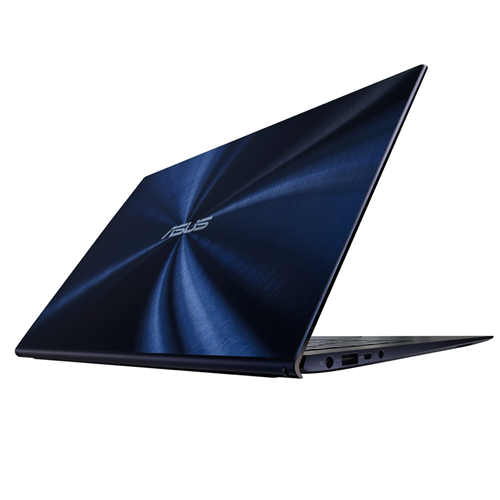
The Zenbook was one of the first laptops
to truly embrace the ultrabook vibe, with slim, tapered metal shells,
and lids that stood out from the crowd with a circular pattern that some
say resembled rippling water. Here the same effect is generated not in
aluminum, but but under a Gorilla Glass 3 lid, over a dark blue
background. The big difference between this and other recent slim
ultrabook-style laptops we've tested is the incredibly high gloss finish
on the back of the lid -- as one would expect from a glass top layer.
At a
bit over 3 pounds, the UX301 feels hefty in the hand, solidly built,
but not as light as some other 13-inch laptops. However, despite the
generally tight-feeling chassis, a very minor bump onto a carpeted floor
left the power pin from the AC adaptor seriously bent out of shape,
although still functional. That's why Apple, for example, has a magnetic
power connection (although I've dropped and bumped plenty of Windows
laptops over the years with nary a bent power plug pin). The matte
black interior features a sunken keyboard with large island-style keys.
Important keys such as Shift, Enter, and Backspace are decently sized,
and the entire keyboard has a very MacBook-like vibe, from the layout of
the arrow keys to the power button at the very top right corner. Typing
was only slightly hindered by some keyboard flex around the center, but
you'll have to be a heavy typist to really notice. The
large clickpad-style touch pad is much better than the versions found
on the early Zenbooks of years ago. Back then, touchpad response was
finicky, and multi-touch gestures were near-useless. This version is as
good as any Windows laptop, with quick response and natural-feeling
inertial scrolling, but I had to turn off the Windows 8 edge gestures because they were too easy to accidentally trigger. The
13.3-inch 2,560x1,440 touch screen display is a system highlight.
Covered with edge-to-edge glass, the touch response was excellent and
off-axis viewing was decent, but not best-in-class. The ultra-high
resolution allows for an amazing level of zoom, and you can
pinch-to-zoom on pages of text to see the effect up close. The glossy
screen does, however, have a lot of glare under normal lighting
conditions, so you may end up twisting and turning to find a glare-free
angle. The speakers are from Bang & Olufsen ICEpower, a
subsidiary of the famous audio company, and sound decent for such a
small laptop, although that may be because they're fired from side-edge
speakers, which gives you an especially wide stereo image.
Touch
Technology with a human touch
Zenbook UX301 is wonderfully tactile, but
that goes well beyond just the feel of its sleek, smooth and durable
glass design. Windows 8 is designed with touch in mind and a dedicated
ASUS Human Computer Interface team help make it even more intuitive to
use with features like a responsive multi-touch display, and a large
touch pad with multi-touch support. The backlit keyboard with automatic
brightness control also means you'll always have a clear view of the
keys, so you can stay productive, even in complete darkness. So
whichever way you like to work, Zenbook UX301 has you covered.
10-POINT CAPACITIVE MULTI-TOUCH DISPLAY
Touch is such an intuitive way to
interact with a computer display, we've been trying to do it for decades
— just ask anyone who sells screen-cleaning kits. The good news is that
with Zenbook UX301, reaching out to touch the screen is no longer an
empty gesture. Its 13.3-inch multi-touch display responds to the
slightest touch in just 30ms, so you can tap an icon to open an app,
pinch a web page to make the text larger, and swipe across the screen to
switch between running applications instantly. Multi-touch makes
everything so much easier.
The power and performance you need
Zenbook UX301 is a high-performance
Ultrabook™ in every sense. A 4th generation Intel® Core™ i7 processor
with Intel Iris™ 5100 graphics make light work of the most demanding
tasks, and keeps you entertained with your favorite games and HD video,
even when you're on the move. Solid-state storage means applications
launch in double-quick time and, together with Super Hybrid Engine II
technology, boosts battery life and standby time to stretch out the time
between recharges. Two USB 3.0 ports support the latest high-speed
storage and recharge mobile devices in double-quick time, while
sophisticated thermal management means Zenbook UX301 never loses its
cool.
Portable power and performance
Zenbook UX301 is powered by 4th
generation Intel® Core™ i7 processors for seamless multi-tasking
performance and outstanding energy efficiency. A high-end 28W Core
i7-4558U dual-core option makes light work of even the most demanding
applications. Intel® Turbo Boost Technology gives a burst of extra speed
up to 3GHz when you really need it, while Intel® HD Graphics 5100 with
Clear Video HD technology gives silky smooth playback with Full HD
video.
Work all day on a single charge
Energy-efficient components like the
Intel® Core™ processor and solid-state drive help Zenbook UX301 last for
up to 8 hours on battery power, so you can get a full day's work done
before you need to recharge. Exclusive Super Hybrid Technology can also
boost battery life by up to 25% for less demanding tasks like web
browsing and watching video, so you can last even longer between trips
to the power socket.
Always ready when you are
No one should have to wait when they want
to get something done, which is why Zenbook UX301 wakes from standby in
just two seconds. Exclusive Super Hybrid Engine II technology gives up
to two weeks' standby time too, and automatically saves all open
applications and data to the solid-state drive when the battery drops
below 5% charge level gets too low. So you don't have to worry about
always leaving Zenbook Touch plugged into a power socket just because
you're not using it.
USB 3.0, the next-generation connection for faster data transfers
USB 3.0 is ten times faster than USB 2.0
and with two ports at your disposal, you can save photos, transfer MP3s
and open multi-gigabyte video files in a fraction of the time with
compatible storage. USB 3.0 has more power for mobile devices, too.
Smartphones and tablets recharge in half the time compared to USB 2.0,
even when Zenbook UX301 is switched off. USB Charger+ technology lets
you charge your devices on-the-go.
Audio
The UX301LA's headphone-microphone combo jack offers satisfactory power,
a succinct stereo image and no interference or background noise.
The speakers are no miracle-workers, but they'll get you through a
videoconference just fine. Just know that (as usual with ultrabooks) any
music you listen to will be reduced to the middle of the spectrum with
little-to-no bass or high-end.
Processing Power
The Intel Core i7-4558U dual-core processor ranges from 2.8 GHz to 3.3
GHz, placing it just ahead of the Core i7-4500U dual-core (1.8 GHz to 3
GHz).
This gives it an average performance about 5% faster than the i7-4500U
found in the Dell Inspiron 14 7000 Series, and about 19% faster than the
i5-4200U that equips the Lenovo IdeaPad Yoga 2 Pro.
That said, it's still a ways behind quad-core processors like the
i7-4700MQ, which is 20% faster on average. But in terms of everyday
usage, it's a highly capable chipset that can handle any type of task in
a reasonable span of time.
Gaming
One unique thing about the Core i7-4558U is that it has an Iris 5100
graphics chipset. This GPU has 40 processing units, which is twice as
much as the HD Graphics 4400 found in many similar ultrabooks, so we
were expecting better gaming performance on it.
Unfortunately, despite having twice as many processing units, it only
performs 10% to 15% better. It's still a night-and-day difference with a
dedicated graphics card, even a mid-range one like the Nvidia GeForce
GT 740M (40% better performance).
You can still play some recent titles, as long as they're ones that don't require much graphics processing power, such as FIFA 13 or Dirt 3,
but even then you'll have to lower the screen resolution in order to
get fluid gameplay. That said, it plays HD videos without a problem.
Battery Life
The UX301LA held out 6 hours and 15 minutes during our battery test of
continuous video playback in airplane mode with the screen brightness at
100 cd/m², headphones plugged in and the keyboard backlighting turned
off. That's excellent battery life (although, of course, the 13" MacBook Air and Sony Vaio Duo 13 last even longer).
Models, specs & options
Asus is offering a number of different configurations and options for the Zenbook Infinity UX301LA:
CPU
2.8-GHz Intel Core i7-4558U
Operating System
Windows 8 Professional
RAM
8GB
RAM Upgradable to
Hard Drive Size
Dual 128GB
Hard Drive Speed
n/a
Hard Drive Type
Dual SSDs
Secondary Hard Drive Size
Secondary Hard Drive Speed
Secondary Hard Drive Type
Display Size
13.3
Native Resolution
2560 x 1440
Optical Drive
None
Optical Drive Speed
n/a
Graphics Card
Intel HD Graphics 5100
Video Memory
Wi-Fi
802.11ac
Wi-Fi Model
Intel Dual Band Wireless-AC 7260
Bluetooth
Bluetooth 4.0
Mobile Broadband
Touchpad Size
3.9 x 2.6 inches
Ports (excluding USB)
Headphone; Mini DisplayPort; Mini HDMI; USB 3.0
USB Ports
2
Card Slots
SD memory reader
Warranty/Support
1-Year International/1-Year Accidental Damage/30-Day Zero Bright Dot/2-way FREE shipping/24-7 tech support
The GoodThe
Asus Zenbook UX301 packs in a lot, including a better-than-HD touch
screen, big 256GB SSD, and Core i7 processor, in a slim, smart design.
The BadIt
costs more than most comparable better-then-HD laptops, including the
Retina MacBook Pro. The Zenbook doesn't feel as rugged as its price
warrants, and its battery life is unimpressive.
The Bottom LineAsus
was one of the first PC makers to go ultra-thin with its Zenbook line.
That latest UX301 version packs in nearly every high-end spec you'd
want, but it's priced out of reach for most, and lacks an all-day
battery.


 Looking
at the frankly ludicrous price tag, one might be forgiven for
mistakenly thinking that a dedicated graphics chip powered the Lenovo
ThinkPad X1 Carbon Touch, but in a laptop this thin all the
pixel-pushing has been left to that Intel Core i7 processor. It does a
good job and performs better than most Ultrabooks, meaning that even the
latest games are within its limitations, if you don't mind sacrificing
some graphics performance.