Pages

  • Twitter
  • Facebook
  • Google+
  • RSS Feed
Showing posts with label ultrabook. Show all posts

Wednesday, April 23, 2014

Glass-topped ultrabook delivers performance, style

Acer is swinging for the fences with the new $1,499 Acer Aspire S7-392-6411 Ultrabook. The second generation of the company's S7 series sports some welcome updates, such as improved battery life, a better keyboard and a fourth-generation Intel Core i5 processor. But the Aspire hasn't ditched the aspects of the S7 we loved, namely the super-slim, all-white chassis and the 1080p touch-screen that continues to turn heads. The end result is a home run for Ultrabook shoppers.

It's hard to believe, but we're getting close to the one-year mark in the Windows 8 era. Microsoft's still-controversial operating system was released in October 2012, and that was long-enough ago that we're now seeing the second generation of some of the initial-launch-period Windows 8 laptops and hybrids.
One of my favorite early Windows 8 laptops was the Acer Aspire S7, and it quickly became a favorite for much of the rest of our PC-savvy staff as well. The original S7 scored points by being a new-from-the-ground-up ultrabook, rather than an existing Windows 7 product updated with new software. The new version, the S7-392-6411, essentially identical on the outside, remains one of the thinnest, slickest-looking ultrabooks available, highlighted by a white minimalist chassis and a lid covered with Gorilla Glass.
Since then, we've seen many thin, touch-screen laptops with high-end processors and 1080p screen resolutions, including the Sony Vaio Pro 13 and the Samsung Ativ Book 9 , plus impressive hybrids such as the Lenovo Yoga 13 . Despite the increase in competition, this remains a great, eye-catching design, thanks to the bold white-and-silver design (a nice break from the dark palette of most laptops) and the Gorilla Glass lid, which promises strength and a lighter overall weight.
Sarah Tew/CNET
The new Aspire S7 moves to Intel's latest fourth-generation Core i-series processors. The 2012 version we tested had a previous-gen Core i7 chip for $1,649, while the 2013 model has a Haswell-generation Core i5 for $1,399.99, which includes a 128GB solid-state drive (SSD) and 8GB of RAM. That's a premium price, especially for a Core i5 laptop, considering a 13-inch MacBook Air starts at $1,099, but it's competitive with similar Sony and Samsung ultrabooks.
This is a hard laptop not to like, and even though the basic design is about 10 months old, it still feels very cutting-edge, at least visually. The $1,399.99 price is still a bit of a reach, especially considering that I don't love the keyboard and touch pad, but it's also very portable and reasonably powerful, and will look great at a coffee shop.

Design and features
Aside from moving a few ports around and the absence of the words "Professionally tuned" stamped above the keyboard, this is essentially the same Aspire S7 design we liked so much last year. It's very thin and light, although the glass-covered lid feels a bit top-heavy. You may recall that the original HP Envy Spectre (from early 2012) had a similar design, putting glass both on the back of the lid and the wrist rest. Here it's just the lid, which is good, as it never really worked on the wrist rest.
Sarah Tew/CNET
Of course, this isn't an all-glass laptop (which sounds like a crazy idea, but I bet someone will eventually pitch one). The rest of the body is aluminum over a plastic base, and the entire thing has a MacBook-like feel. White (behind the glass surface on the back of the lid) and silver is an unusual, but not unheard-of, color combination these days. Most laptops, apart from MacBooks, tend to be matte or glassy black, with maybe a little gray or some red accents thrown in. Just by being different the Aspire S7 achieves an upscale look that stands out.

The keyboard has flat-topped, island-style keys that sit in a gently sloping, indented keyboard tray. The keys feel deeper than the original S7's, based on my memory of that system, making for a less error-prone experience -- but it may just be that my tolerance for shallow ultrabook keyboards has grown with repeat exposure. One thing I miss is having a separate row of Function keys; instead those functions are mapped as alternates to the numeral keys. It's an odd omission, as there's plenty of room at the top of the keyboard for an additional row.
Sarah Tew/CNET
The large touch pad has a great surface with just enough friction, but multitouch gestures are a bit finicky. Interestingly, this version has a Synaptics touch pad, rather than the Elan model on the original S7 from 2012. Side by side, I'd say this new S7's touch pad is more responsive, but it still pales in comparison with what you get from a MacBook.
One highlight of the system is the 1,920x1,080-pixel-resolution, 13.3-inch display. Despite some touch-screen laptops making their lids slightly thicker, the lid here still seems very thin, and is perfectly flat, not convex at all. The screen has decent off-axis viewing and while it's glossy, it's not overly reflective.
The screen hinge is designed with touch-screen use in mind. It acts like any other laptop hinge from the closed position to about 120 degrees or so. After that, the hinge stiffens considerably, so tapping and swiping on the screen results in less shaking or movement under your fingers. It's a small feature, but a clever one for Windows 8 laptops.

Features Acer Aspire S7
Video HDMI and Mini DisplayPort
Audio Stereo speakers, combo headphone/microphone jack
Data 2 USB 3.0, SD card reader
Networking 802.11n Wi-Fi, Bluetooth
Optical drive None  
System configurations
Acer Aspire S7-392-6411
Windows 8 (64-bit); 1.6GHz Intel Core i5-4200U; 8GB DDR3 SDRAM 1,600MHz; 128MB (Dedicated) Intel HD Graphics 4400: 128GB SSD

Connections, performance, and battery
On a small laptop, you're going to give up a certain number of ports and connections, but at least the new S7 has two video outputs, HDMI and Mini DisplayPort. You also get a couple of USB 3.0 ports and an SD card slot, but no Ethernet jack, which would be tough to fit into the slim body.
Sarah Tew/CNET
Unlike the more expensive Acer Aspire S7 we tested in late 2012, this newer model has an Intel Core i5 CPU instead of a more powerful Core i7 one. In day-to-day use, the effect is minimal, especially as the Core i5 here is from the latest generation of Intel CPUs, aka Haswell. In anecdotal use, just like the roughly comparable Sony Vaio Pro 13 or Samsung Ativ Book 9, the S7 always felt fast and responsive, including excellent touch-screen response. It's certainly more power than you're likely to need for Web surfing, social media, office productivity, and HD video playback.
Battery life is where the advantage of Intel's Haswell chips is really felt. The Acer Aspire S7 ran for 7 hours and 14 minute sin our video playback battery drain test, about 50 minutes longer than the pre-Haswell S7 we tested in 2012. That's not at great compared with the 12-plus hours you'll get from a 13-inch MacBook Air, but it's a solid number for a 13-inch ultrabook.

Sarah Tew/CNET

Heat

Acer outfitted the S7 with a new thermal system designed to keep the laptop at a cooler temperature. Comprised of a pair of high-speed thermal fans, the TwinAir system uses one fan to pull in cool air, while the other blows out hot air.

After 15 minutes of streaming a full-screen Hulu video on the S7, the notebook's touchpad measured a cool 79 degrees Fahrenheit. The space between the G and H keys and the S7's undercarriage were slightly warmer, at 84 and 85 degrees, respectively. All of these measurements are below our comfort threshold of 95 degrees. Nevertheless, the previous S7 registered a cooler 75, 80 and 80 degrees in the same locations.
Toward the back of the S7, near the hinge, we measured a toasty 101 degrees, but it wasn't uncomfortable in our lap.


Source

Engadget Acer Aspire S7-392 Reviews (Critic Reviews 8.4/10, User Reviews 8.0/10)

Laptop Mag Acer Apire S7-392 Reviews (4/5)

PC Mag Acer Aspire S7-392-6411 Reviews (4.5/5)

CNET Acer Aspire S7-392-6411 Reviews (CNET Editor's Rating 4/5, Average User Rating 2/5)

Official Website


Where to Buy

 Official Website

$1308.00 Beach Camera Acer Aspire S7 Series 13.3" Ultrabook HD Touchscreen Intel i5-4200U (S7-392-6832)*free shipping

$1,571.95 Office Depot Acer Aspire S7-392-74508G25tws 13.3" Touchscreen LED (In-plane Switching (IPS) Technology) Ultrabook - Intel Core i7 i7-4500U 1.80 GHz - Crystal White

$1,249.99 Adorama Acer Aspire S7-392-6832 13.3" Full HD Touchscreen Ultrabook Computer, Intel Core i5-4200U 1.6GHz, 8GB RAM, 128GB SSD, Win 8 Home, White*free shipping

$1,718.99 InterStateMusic Acer - NXMBKAA008 Aspire Multi-Touch 13.3" 8G Ultrabook Computer*free shipping

$1,339.00 PCNation Acer Aspire S7-392-54208G12tws 13.3" Touchscreen LED (In-plane Switching (IPS) Technology) Ultrabook - Intel Core i5 i5-4200U 1.60 GHz - Crystal White - NX.MBKAA.008*free shipping


$1297.82 Provantage Aspire S7-392-6411 i5-4200U 1.6GHz 8GB 125GB SSD 13.3" Multi-Touch W8 - White


$1,339.19 PCRush Acer Aspire S7-392-54208G12tws 13.3" LED Inter Core i% i%-4200U 1.60 GHz 8GB RAM 128GB SSD Windows 8 64-bit Ultrabook*free ground shipping


$1299.00 Buy Dig Acer Aspire S7 Series 13.3" Ultrabook HD Touchscreen Intel i5-4200U (S7-392-6832)*free shipping

$1,647.00 Amazon Acer Aspire S7-392-9439 13.3-inch WQHD Touchscreen Ultrabook (Crystal White)*free shipping

$1,349.99 Amazon Acer Aspire S7-392-9890 13.3-Inch Touchscreen Ultrabook (Crystal White)*free shipping

$1,378.36 Amazon Acer Aspire S7-392-6807 13.3-Inch WQHD Touchscreen Ultrabook (Crystal White)*free shipping

$1,199.99 Amazon Acer Aspire S7-392-6832 13.3-Inch Touchscreen Ultrabook (Crystal White)*free shipping

Friday, April 18, 2014

The Thinkpad Ultrabook Gets a High-End Windows 8 Touch

High performance laptops are nothing new, but until recently they were hulking beasts that could break one's back if carried out of the house. Things have changed - it's now possible to have top performance in ultra-portable packages, as demonstrated by the Lenovo ThinkPad X1 Carbon Touch Ultrabook.
It's hard to classify the Lenovo's direct competitors due to the huge variety of Windows 8 hybrids and laptops on the market. The rulebook has been ripped up and with a traditional laptop design with an added touchscreen, the Lenovo ThinkPad X1 Carbon Touch is one of the more conservative offerings. High performance laptop hybrids such as the Sony Vaio Duo 13 spring to mind, as do traditional Ultrabooks such as the Dell XPS 13 and MacBook Pro with Retina display.
The original 2012 Lenovo X1 Carbon was the best ThinkPad money could buy, but now Lenovo has added a touchscreen panel and changed Windows 7 Professional for Windows 8, bringing last year's model right up to date.
Lenovo ThinkPad X1 Carbon Touch review
 The result is a formidable machine that not only offers the best usability and performance, but also a fantastic Windows 8 experience. However, the eye-watering price tag of £1,779 / US$2,139 / AU$2,538 means this experience doesn't come cheap.
Pick the Lenovo ThinkPad X1 Carbon Touch up and it's immediately apparent that you're holding a different class of laptop. ThinkPad has always been a predominately business brand and you'll have seen the familiar black matt chassis punctuated by that red mouse pointer in Starbucks and train stations all over the place.
Being a ThinkPad, the X1 Carbon Touch retains the looks synonymous with this illustrious range, but the similarities with bog-standard corporate machines end there. Yes there's the red mouse nipple, which is bemusing when a touchscreen and full-sized trackpad are on offer, but it's an example of how important the look of the X1 Carbon Touch is to Lenovo.
Lenovo ThinkPad X1 Carbon Touch review
However, when you pick up the Lenovo ThinkPad X1 Carbon Touch for the first time, the solid, flexless build, smooth rubberised finish and lightweight chassis can't fail to impress. The fact that this machine weighs just 1.5kg (3.3lbs) yet counts as one of the most powerful Ultrabooks on the market speaks volumes about what Lenovo has achieved.
Other Ultrabooks that have tried to achieve this balance of weight and power have ended up scrimping on build quality - such as the HP Envy 15 with its awful trackpad or the Acer Aspire S7 and its keyboard, but the Carbon oozes quality from every port.
From the beautifully spaced and comfortable keyboard that enables immediate, accurate speed typing to the smooth and responsive trackpad to the luxurious panel that manages to marry vibrancy and clarity with a non-reflective finish.
Lenovo ThinkPad X1 Carbon Touch review
Windows 8 review
Windows 8 review
It's not just the weight - or lack of - that makes the Lenovo ThinkPad X1 Carbon Touch such a engineering triumph, it's also the thickness. Despite measuring 22mm (0.87 inches) at its thickest point - a not exactly size-zero waistline - the Carbon's wedge shape gives it the impression of blade-like thinness. It's alluring to look at and commands attention, attracting admiring comments from those around you.
However, to ace a TechRadar review, you need more than alluring looks. So let's get under the hood and see how good the Lenovo ThinkPad X1 Carbon Touch really is.

The expected ThinkPad amenities are standard, including vPro management, TPM, a fingerprint reader, and even an optional integrated WWAN (3G) radio. The carbon fiber cover and cage are, in Lenovo’s parlance, “satellite quality,” and the chassis certainly feels more durable than Sputnik.
Lenovo also hasn’t forgotten about the things that users actually care about. Audio is impressive and Dolby-certified. The keyboard is backlit and fully usable, and the glass touchpad was rock solid on this go-round with the Carbon. (The 2012 unit I tested had a disturbingly loose one.)

Only two complaints marred my experience with the X1 Touch. Foremost is battery life. While I managed to score an extra half hour of video playback versus the old X1, at 3.5 hours of running time, it is still at the bottom of the heap of Windows 8 laptops when it comes to longevity. The screen is also relatively dim, and colors look a bit washed out in comparison to other recent-model laptops.
Of course, there’s also the not-insubstantial price to consider, too. The X1 Touch starts at $1,350 and, as configured, runs a hefty $1,729. That’s cheaper than the non-touch Carbon I reviewed in the fall, but still a huge investment in a laptop, and hundreds of dollars more expensive than the competition in this space. (Acer’s 14-inch Aspire M may be heavier, but it’s less than half the price.)
If you’re trying to convince your boss to buy one for you, my recommendation is lean heavily on the bit about the satellite.

WIRED Excellent combination of performance, portability, and durability. Still the best keyboard going. Trackpad issues resolved. You want bells and whistles?
TIRED Probably the most expensive computer in its class. Screen not as impressive as the previous generation. Battery life upgraded, but still not enough.


Specifications
Under the hood is an Intel Core i7 processor 3667U, the U in that pithy moniker indicating that it's one of the ultra low-power chips designed for Ultrabooks. It packs considerably more power than the likes of the Asus Zenbook or Samsung Series 9, since it's clocked at an impressive 2GHz.
The benchmark scores from our lab tests back this up too, with a top-end performance resulting in roughly 10 per cent more power than rival Ultrabooks such as the Asus Zenbook.
Lenovo ThinkPad X1 Carbon Touch review
The Core i7 chip is also left to handle the graphics tasks in the absence of a dedicated graphics card. It has become the norm for manufacturers to leave 3D graphics to the onboard processor now, but it means that despite the sky-high price tag, the Lenovo ThinkPad Carbon X1 isn't the best choice for heavy video editors or gamers.
Elsewhere there's a whopping 8GB of RAM, an amount normally reserved for gaming machines or high-end powerhouses such as the Samsung Series 7 Chronos. This helps keep the Lenovo ThinkPad X1 Carbon Touch noticeably quick, helping a slick, breathless performance.
There are several models of the Lenovo ThinkPad X1 Carbon Touch at a range of price points, and our model packed a 256GB SSD drive, the highest you can get. The only criticism here is the lack of usable space, and of the 256GB on offer, only 190GB was usable.
Lenovo ThinkPad X1 Carbon Touch reviewLooking at the frankly ludicrous price tag, one might be forgiven for mistakenly thinking that a dedicated graphics chip powered the Lenovo ThinkPad X1 Carbon Touch, but in a laptop this thin all the pixel-pushing has been left to that Intel Core i7 processor. It does a good job and performs better than most Ultrabooks, meaning that even the latest games are within its limitations, if you don't mind sacrificing some graphics performance.
Of course, the 14-inch, 1600 x 900 resolution panel is a key part of this updated Lenovo ThinkPad X1 Carbon Touch, and while we'd like to have seen 1080p included given the price, it's still a good performance.
The colours look great, it's pin sharp despite not being Full HD and it's as great for watching a movie as it is for working on a presentation. What's more, the touch sensitivity is as good as we've seen on a Windows 8 device, and it's miraculously free from smearing.
Lenovo ThinkPad X1 Carbon Touch review
For a laptop that measures 22mm at its thickest point, connectivity is underwhelming, with two USB 3.0 ports, one of which can charge devices when the laptop is sleeping.
There's also DisplayPort for connecting to external monitors and an SD card, but no Ethernet, HDMI or VGA, which will mean carrying extra dongles to your meetings. However, business users will love the fingerprint reader and hard drive protection.

Performance

Benchmarks
Cinebench 10: 11,498
3D Mark: Ice: 32,650 Wind: 3787 Fire: 512
Battery: 192 mins
With a score of 11,498 in our processor tests, it's clear that the Lenovo ThinkPad X1 Carbon Touch is a formidable machine. This kind of score ranks among some of the best performing Ultrabooks on the market, and even manages to give the next generation of Intel processors a run for their money.
Other than top multitasking and app switching speeds, the i7 processor speeds up boot times, enabling it to go from cold to a usable Windows 8 home screen in roughly 15 seconds. Even better is the resume from sleep, which averaged around four seconds, partly due to Windows 8's improvements and of course that wickedly fast chip.
Lenovo ThinkPad X1 Carbon Touch review
However, there's a downside. The high performance third generation Intel Core i7 chip colludes to suck power from the Lenovo ThinkPad X1 Carbon Touch, especially under heavy strain. The result is an uninspiring three hours of battery life in our test, which involves looping a high definition clip with full screen brightness until the laptop dies.
Three hours is one of the lowest Ultrabook battery scores we've seen, and should ring alarm bells for anyone who intends to use the Lenovo ThinkPad X1 Carbon Touch at high load while away from mains electricity.
Turning the screen brightness down and sticking to moderate web tasks increases lifespan to around four hours, which is still underwhelming when you consider the Samsung Vaio Duo 13 running Intel's latest Haswell fourth generation processor managed six hours in the same test.
Lenovo ThinkPad X1 Carbon Touch review
If you spend long periods on the road, you could be frustrated by the disappointing longevity, especially given the Ultrabook's sky-high price tag. Intel's new chips, announced in May and being released in earnest later this year, will offer better longevity and battery performance, which makes the £1,779 / US$2,139 / AU$2,538 price seem even less appealing.
As with most Ultrabooks there's no dedicated graphics, and while games might be playable on lower settings, it's in no way suited to overly creative tasks or heavy video editing. We wouldn't normally pull up an Ultrabook for this failing, but then most Ultrabooks don't cost this extraordinary sum.

Connections, and battery
Like many business systems, the X1 Carbon skips the SD card slot (a security concern for some), but you do get two video outputs, both HDMI and Mini DisplayPort. Ethernet requires a dongle, but Lenovo would no doubt like you to use one of its OneLink docks to add additional connectivity, including DVI, full Ethernet, and four USB 3.0 ports. That standalone dock costs $179, a hefty additional investment, but I use an older USB-powered version, and have found it to be excellent.
In our benchmark tests, the Core i5-powered X1 Carbon performed as expected when compared with other recent ultrabooks with higher-than-1080p displays. Nearly all these systems have fourth-gen Core i5 CPUs, from Intel's ultra-low-power line (except the Toshiba Kirabook , which has a previous-generation Core i7), and you'll find any of these more than powerful enough for everyday personal and business tasks, from putting together PowerPoint presentations to social media and Web surfing to streaming HD video.

Given all that, what we're really looking for from the X1 Carbon is amazing battery life. A slim, on-the-go laptop needs to last all day, and while the X1 does well, it's not a long-lived as some. The system ran for 5 hours, 41 minutes, in our video playback battery drain test, which is merely OK, and not in the same ballpark as the 13-inch MacBook Pro, nor even the Samsung Ativ Book 9 Plus or Lenovo Yoga 2 Pro. Keep in mind that all of the systems mentioned here have better-than-HD displays.
Conclusion
The third version of the ThinkPad X1 is the best to date, and it remains one of the only choices for a slim, high-design business laptop with premium features. The addition of both a 2,560x1,440-pixel-resolution display and the adaptive function key row is welcome, but these upgrades also drive the price up high enough that you're likely to have to twist some arms to get your IT department to get this as your next work laptop.

Lenovo ThinkPad X1 Carbon (2014)
Windows 8.1 (64-bit); 1.6GHz Intel Core i5-4200U; 8GB DDR3 SDRAM 1,600MHz; 1,792MB (shared) Intel HD Graphics 4400; 128GB Samsung SSD.


Source
PCMag Lenovo Thinkpad X1 Carbon Touch Reviews (Editor Rating 3.5/5)
Engadget Lenovo Thinkpad X1 Carbon Touch Reviews (Critic Reviews 7.7/10, User Reviews 9.0/10) -Jan 13, 2014
Wired Lenovo Thinkpad X1 Carbon Touch Reviews (8/10) 
CNET Lenovo Thinkpad X1 Carbon Touch Reviews (CNET Editor's Rating 4/5) -Feb 12, 2014
Techradar Lenovo Thinkpad X1 Carbon Touch Reviews (Design 4.5/5, Features 4.5/5, Performance 3.5/5, Usablitiy 4.5/5, Value 2.5/5) -July 25, 2013
Official Website

Where to Buy
$1,309.00 Official Website Customize your ThinkPad X1 Carbon Ultrabook
$1,249.00 Amazon Lenovo ThinkPad X1 Carbon 14" Ultrabook - 3444-B8U*free shipping
$1,850.62 Amazon Lenovo New ThinkPad X1 Carbon 14" Touchscreen LED In-plane Switching (IPS) Ultrabook - Intel i7-4600U, 8GB RAM, 256 SSD, Windows 8.1, 3 Year Warranty - 20A70037US*free shipping
$1,519.00 Amazon Lenovo ThinkPad X1 Carbon 14-Inch Touchscreen Laptop (Black)3444CUU*free shipping
$1,969.99 Amazon Lenovo Thinkpad X1 Carbon Ultrabook - Core i7 3667U / Windows 7 Professional 64-bit - 8 GB RAM - 256 GB SSD - 14" wide 1600 x 900 / HD+ - Intel HD Graphics 4000 - 3 Year Warranty*+ $7.99 shipping
$1,749.00 Amazon Lenovo ThinkPad X1 Carbon 20A7002WUS 14" LED (In-plane Switching (IPS) Technology) Ultrabook - Intel - Core i7 i7-4600U 2.1GHz - Black 20A7002WUS Laptops & Notebooks*free shipping
$1,749.99 Amazon Lenovo ThinkPad X1 Carbon 3444F9U 14-Inch LED Ultrabook (2GHz Intel Core i7 i7-3667U, 1600 x 900 HD+ Display, 8 GB RAM, 180 GB SSD, Bluetooth, Webcam, FingerPrint Reader, Windows 7 Pro) Black* + $9.49 shipping 
$1,499.00 Adorama Lenovo ThinkPad X1 Carbon 14" Multi Touch Ultrabook Computer, Intel Core i7-3667U 2.0GHz, 8GB RAM, 240GB SSD, Windows 8 Professional 64-bit*free shipping
$1720.88 Provantage Lenovo ThinkPad 3444CUU X1 Carbon i7-3667U 8GB 240GB SSD 14" Touch
$1,863.79 PCRush  Lenovo ThinkPad X1 Carbon 3444CUU 14" LED Ultrabook - Intel - Core i7 i7-3667U 2GHz - Black*free ground shipping
$1,876.62 PCNation Lenovo ThinkPad X1 Carbon 3444CUU 14" Touchscreen LED Ultrabook - Intel - Core i7 i7-3667U 2GHz - Black - 3444CUU


Tuesday, April 15, 2014

The stunning, stylish touchscreen Ultrabook with a scratch-resistant finish

Asus made good at its promise to officially reveal the Zenbook Infinity (UX301 and UX302), its super thin but power-intensive touchscreen ultrabook, at Computex this week.
Just several hours later, TechRadar and the Infinity were getting up close and personal, and while Asus is yet to confirm a few final specifics, we had more than enough time with it to form some initial impressions.
A few years ago, nearly every PC maker had its own version of the idea ultrabook (some would call them MacBook Air clones), with a slim body, low-voltage CPU, 13-inch screen, and a premium price. In 2014, the nearly identical laptop everyone needs to have is a radically updated version of that ultrabook, adding Windows 8, a touch screen, and a better-than-HD screen resolution.
The Asus UX301 joins the Toshiba KiraBook, Apple MacBook Pro, Lenovo Yoga 2 Pro, Samsung Ativ Book 9 Plus, and others in offering a touch screen that goes beyond 1080p. In this case, it's a 2,560x1,440 display, which has so far proven to be slightly more common than the 3,200x1,800 version found in the Yoga 2 and Razer's upcoming Blade 14.

Asus Zenbook UX301LA-DH71T
In either case, it's a lot of pixels to push on such a small screen, but there are definite benefits in reading on-screen text and editing high-resolution photos. It's not an extra feature that counts as a must-have just yet, but just as touch screens have gone from oddity to standard feature in less than two years, I can see these higher resolutions coming to more and more laptops in the near future. Hopefully, many of those future models won't cost quite as much as as this one. At $1,899 (it's about $50 less at most online stores), this configuration of the UX301 is about as expensive as non-gaming laptops get. The components are appropriately premium, to be sure, with an Intel Core i7 CPU and big 256GB SSD, but only 8GB of RAM and no other particularly unique features, aside from scratch-resistant Gorilla Glass 3 on both sides of the lid. A 13-inch Retina MacBook Pro with similar specs (but minus the touch screen, of course), is $1,799. Likewise, a similarly configured Samsung Ativ Book 9 Plus can be found for about $1,750, with an even higher-res 3,200x1,800 screen. With just a bit of daylight between the prices of comparable laptops, your preference will likely rest on subjective impressions of the design, keyboard, and touch pad (all very good here, but the same could be said for the Ativ Book 9 Plus, for example). And keep in mind, if a better-than-HD screen is the main feature you're after, Lenovo's Yoga 2 Pro offers a 13-inch 3,200x1,800 hybrid for just about $1,000.

Design and features

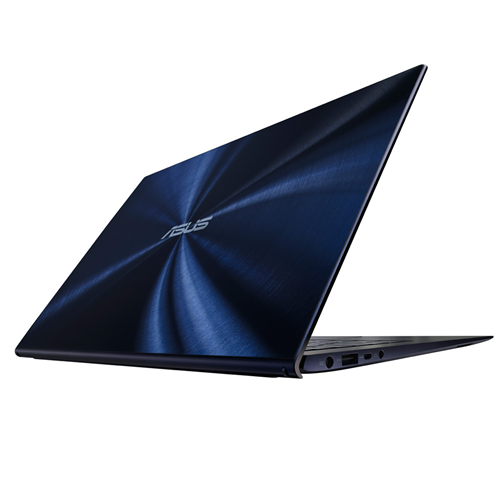
The Zenbook was one of the first laptops to truly embrace the ultrabook vibe, with slim, tapered metal shells, and lids that stood out from the crowd with a circular pattern that some say resembled rippling water. Here the same effect is generated not in aluminum, but but under a Gorilla Glass 3 lid, over a dark blue background. The big difference between this and other recent slim ultrabook-style laptops we've tested is the incredibly high gloss finish on the back of the lid -- as one would expect from a glass top layer.

Asus Zenbook UX301LA-DH71T
At a bit over 3 pounds, the UX301 feels hefty in the hand, solidly built, but not as light as some other 13-inch laptops. However, despite the generally tight-feeling chassis, a very minor bump onto a carpeted floor left the power pin from the AC adaptor seriously bent out of shape, although still functional. That's why Apple, for example, has a magnetic power connection (although I've dropped and bumped plenty of Windows laptops over the years with nary a bent power plug pin). The matte black interior features a sunken keyboard with large island-style keys. Important keys such as Shift, Enter, and Backspace are decently sized, and the entire keyboard has a very MacBook-like vibe, from the layout of the arrow keys to the power button at the very top right corner. Typing was only slightly hindered by some keyboard flex around the center, but you'll have to be a heavy typist to really notice.
Asus Zenbook UX301LA-DH71T
The large clickpad-style touch pad is much better than the versions found on the early Zenbooks of years ago. Back then, touchpad response was finicky, and multi-touch gestures were near-useless. This version is as good as any Windows laptop, with quick response and natural-feeling inertial scrolling, but I had to turn off the Windows 8 edge gestures because they were too easy to accidentally trigger. The 13.3-inch 2,560x1,440 touch screen display is a system highlight. Covered with edge-to-edge glass, the touch response was excellent and off-axis viewing was decent, but not best-in-class. The ultra-high resolution allows for an amazing level of zoom, and you can pinch-to-zoom on pages of text to see the effect up close. The glossy screen does, however, have a lot of glare under normal lighting conditions, so you may end up twisting and turning to find a glare-free angle. The speakers are from Bang & Olufsen ICEpower, a subsidiary of the famous audio company, and sound decent for such a small laptop, although that may be because they're fired from side-edge speakers, which gives you an especially wide stereo image.

Touch

Technology with a human touch

Zenbook UX301 is wonderfully tactile, but that goes well beyond just the feel of its sleek, smooth and durable glass design. Windows 8 is designed with touch in mind and a dedicated ASUS Human Computer Interface team help make it even more intuitive to use with features like a responsive multi-touch display, and a large touch pad with multi-touch support. The backlit keyboard with automatic brightness control also means you'll always have a clear view of the keys, so you can stay productive, even in complete darkness. So whichever way you like to work, Zenbook UX301 has you covered.

10-POINT CAPACITIVE MULTI-TOUCH DISPLAY
Touch is such an intuitive way to interact with a computer display, we've been trying to do it for decades — just ask anyone who sells screen-cleaning kits. The good news is that with Zenbook UX301, reaching out to touch the screen is no longer an empty gesture. Its 13.3-inch multi-touch display responds to the slightest touch in just 30ms, so you can tap an icon to open an app, pinch a web page to make the text larger, and swipe across the screen to switch between running applications instantly. Multi-touch makes everything so much easier.
  

The power and performance you need

Zenbook UX301 is a high-performance Ultrabook™ in every sense. A 4th generation Intel® Core™ i7 processor with Intel Iris™ 5100 graphics make light work of the most demanding tasks, and keeps you entertained with your favorite games and HD video, even when you're on the move. Solid-state storage means applications launch in double-quick time and, together with Super Hybrid Engine II technology, boosts battery life and standby time to stretch out the time between recharges. Two USB 3.0 ports support the latest high-speed storage and recharge mobile devices in double-quick time, while sophisticated thermal management means Zenbook UX301 never loses its cool.

Portable power and performance
Zenbook UX301 is powered by 4th generation Intel® Core™ i7 processors for seamless multi-tasking performance and outstanding energy efficiency. A high-end 28W Core i7-4558U dual-core option makes light work of even the most demanding applications. Intel® Turbo Boost Technology gives a burst of extra speed up to 3GHz when you really need it, while Intel® HD Graphics 5100 with Clear Video HD technology gives silky smooth playback with Full HD video.
Work all day on a single charge
Energy-efficient components like the Intel® Core™ processor and solid-state drive help Zenbook UX301 last for up to 8 hours on battery power, so you can get a full day's work done before you need to recharge. Exclusive Super Hybrid Technology can also boost battery life by up to 25% for less demanding tasks like web browsing and watching video, so you can last even longer between trips to the power socket. 

 
Always ready when you are​​ 

No one should have to wait when they want to get something done, which is why Zenbook UX301 wakes from standby in just two seconds. Exclusive Super Hybrid Engine II technology gives up to two weeks' standby time too, and automatically saves all open applications and data to the solid-state drive when the battery drops below 5% charge level gets too low. So you don't have to worry about always leaving Zenbook Touch plugged into a power socket just because you're not using it.


USB 3.0, the next-generation connection for faster data transfers 
USB 3.0 is ten times faster than USB 2.0 and with two ports at your disposal, you can save photos, transfer MP3s and open multi-gigabyte video files in a fraction of the time with compatible storage. USB 3.0 has more power for mobile devices, too. Smartphones and tablets recharge in half the time compared to USB 2.0, even when Zenbook UX301 is switched off. USB Charger+ technology lets you charge your devices on-the-go. 
Audio

The UX301LA's headphone-microphone combo jack offers satisfactory power, a succinct stereo image and no interference or background noise.
UX301 audio


The speakers are no miracle-workers, but they'll get you through a videoconference just fine. Just know that (as usual with ultrabooks) any music you listen to will be reduced to the middle of the spectrum with little-to-no bass or high-end.
Processing Power
The Intel Core i7-4558U dual-core processor ranges from 2.8 GHz to 3.3 GHz, placing it just ahead of the Core i7-4500U dual-core (1.8 GHz to 3 GHz).
UX301 CPU

This gives it an average performance about 5% faster than the i7-4500U found in the Dell Inspiron 14 7000 Series, and about 19% faster than the i5-4200U that equips the Lenovo IdeaPad Yoga 2 Pro. That said, it's still a ways behind quad-core processors like the i7-4700MQ, which is 20% faster on average. But in terms of everyday usage, it's a highly capable chipset that can handle any type of task in a reasonable span of time.

Gaming

One unique thing about the Core i7-4558U is that it has an Iris 5100 graphics chipset. This GPU has 40 processing units, which is twice as much as the HD Graphics 4400 found in many similar ultrabooks, so we were expecting better gaming performance on it.
UX301 GPU
Unfortunately, despite having twice as many processing units, it only performs 10% to 15% better. It's still a night-and-day difference with a dedicated graphics card, even a mid-range one like the Nvidia GeForce GT 740M (40% better performance).

You can still play some recent titles, as long as they're ones that don't require much graphics processing power, such as FIFA 13 or Dirt 3, but even then you'll have to lower the screen resolution in order to get fluid gameplay. That said, it plays HD videos without a problem.

Battery Life

The UX301LA held out 6 hours and 15 minutes during our battery test of continuous video playback in airplane mode with the screen brightness at 100 cd/m², headphones plugged in and the keyboard backlighting turned off. That's excellent battery life (although, of course, the 13" MacBook Air and Sony Vaio Duo 13 last even longer).

Models, specs & options

Asus is offering a number of different configurations and options for the Zenbook Infinity UX301LA:

  • CPU
    2.8-GHz Intel Core i7-4558U
    Operating SystemWindows 8 Professional
    RAM
    8GB
    RAM Upgradable to

    Hard Drive Size
    Dual 128GB
    Hard Drive Speed
    n/a
    Hard Drive Type
    Dual SSDs
    Secondary Hard Drive Size
    Secondary Hard Drive Speed
    Secondary Hard Drive Type
    Display Size
    13.3
    Native Resolution
    2560 x 1440
    Optical Drive
    None
    Optical Drive Speed
    n/a
    Graphics Card
    Intel HD Graphics 5100
    Video Memory

    Wi-Fi
    802.11ac
    Wi-Fi ModelIntel Dual Band Wireless-AC 7260
    Bluetooth
    Bluetooth 4.0
    Mobile Broadband

    Touchpad Size3.9 x 2.6 inches
    Ports (excluding USB)
    Headphone; Mini DisplayPort; Mini HDMI; USB 3.0
    USB Ports
    2
    Card Slots
    SD memory reader
    Warranty/Support1-Year International/1-Year Accidental Damage/30-Day Zero Bright Dot/2-way FREE shipping/24-7 tech support
    Size12.8 x 8.8 x 0.6 inches
    Weight2.6 pounds
Source
Engadget Asus Zenbook UX301 Reviews (Critic Reviews 8.8/10) -March 7, 2014
Digital Versus Asus Zenbook UX301 Reviews (Digital Versus Rating 5/5, User Average Rating 5/5) -March 7, 2014
CNET Asus Zenbook UX301 Reviews (CNET Editor Rating 3.5/5, Average User Rating 5/5) -March 30, 2014
The Good The Asus Zenbook UX301 packs in a lot, including a better-than-HD touch screen, big 256GB SSD, and Core i7 processor, in a slim, smart design.
The Bad It costs more than most comparable better-then-HD laptops, including the Retina MacBook Pro. The Zenbook doesn't feel as rugged as its price warrants, and its battery life is unimpressive.
The Bottom Line Asus was one of the first PC makers to go ultra-thin with its Zenbook line. That latest UX301 version packs in nearly every high-end spec you'd want, but it's priced out of reach for most, and lacks an all-day battery.
Laptop Mag Asus Zenbook UX301 Reviews (4/5) -Des 6, 2013 

 
© 2012. Design by Main-Blogger - Blogger Template and Blogging Stuff