The S4 Mini was a competent handset, but we're hoping for more this time around.
Samsung's range of mini mobiles might not have the headline specs of the Galaxy S or Galaxy Note phones but they've carved out a sizeable niche for themselves.
Popular
with those who want something slightly smaller and cheaper, but with
many of the same positive qualities as Samsung's flagships, the Mini
series started life in 2012 with the introduction of the Galaxy S3 Mini.
The
Samsung Galaxy S5 Mini will be the Korean firm's third iteration of
this product line, and while no concrete details are known yet the
rumors and leaks are starting to paint a picture of what to expect.
There's little doubt that we will be seeing the Galaxy S5 Mini soon however, after Samsung New Zealand leaked details of the handset online.
We've seen the S3 Mini and Galaxy S4 Mini turn up with severely cut down spec lists compared to their full fat brothers, but the introduction of the Sony Xperia Z1 Compact saw it inherit the same processor, RAM, GPU and 20.7MP camera from the flagship Xperia Z1.
Could Samsung take a leaf out of Sony's book for the Galaxy S5 Mini? We sure do hope so, but it's pretty unlikely.
Cut to the chase What is it? A cut down version of the flagship Galaxy S5 When is it out? Possibly May/June 2014 What will it cost? Expected to be £350-£400 (around $550, AU$650) SIM free
Samsung Galaxy S5 Mini release date and price
It's not known when the Samsung Galaxy S5 Mini will be released, but it is expected sooner rather than later. The Samsung Galaxy S4 Mini
for reference arrived at the end of June and there's a good chance
we'll see its successor around then too, with some reports suggesting an
earlier May release.
Don't expect a big fanfare around
the Galaxy S5 Mini launch though, as Samsung tends to prefer a soft
launch in the way of a press release.
There aren't any
price rumors yet but the S4 Mini launched for around £350 / $520 SIM
free, so we'd expect the S5 Mini to be around the same, putting it at
the upper end of the mid-range.
With increasingly fierce competition from the likes of the Motorola Moto G and the Google Nexus 5 you can always hope that Samsung might bring the price down, but we reckon chances are slim.
With mini in the name it's a given that the Galaxy S5 Mini's screen will be smaller than the display on the full size Samsung Galaxy S5 - that is after all, the point of this product category - but by the looks of things it won't exactly be tiny.
Thw Galaxy S4 Mini had a lowly qHD resolution
Sam Mobile reports
that the handset is set to ship with a 4.5-inch 1280 x 720 Super AMOLED
screen, so it won't be full HD but if these rumors are accurate it will
be both higher resolution and slightly bigger than the qHD (540 x 960)
Galaxy S4 Mini.
That's not exactly "Mini", and means the Galaxy S5 Mini would still be bigger than the 4-inch iPhone 5S, but considering the LG G2 Mini has a 4.7-inch display Samsung will actually be a little more sensible if it sticks to 4.5 inches.
Samsung Galaxy S5 Mini power
For
Samsung, mini seems to mean both smaller and lower powered and the
Galaxy S5 Mini will probably be no exception. So if you're expecting
something along the lines of the Z1 Compact you're likely to be
disappointed.
Having said that, current rumors point to a device that's rather more capable than the Samsung Galaxy S4 Mini. Sam Mobile's insiders claim
that the Galaxy S5 Mini has a quad-core Snapdragon processor and 1.5GB
of RAM, so while it will hardly be high end it could seriously show up
the dual-core Galaxy S4 Mini.
What model the processor
will be is unknown but Snapdragon 400 seems to be the processor of
choice for mid-range phones at the moment so that seems likely.
Snapdragon is favorite for the S5 Mini, but which one?
The speed the processor will be clocked at is unclear, however a user agent profile
for a device named SM-G750A popped up on Samsung's servers in March and
the profile revealed that the device had a 2.3GHz quad-core processor.
That
would be pretty speedy, but it's possible that this is the Galaxy S5
Neo rather than the S5 Mini, especially as the most recent model number
rumors point to the S5 Mini being the SM-G800.
Plus a
Snapdragon 400 chip wouldn't support speeds that fast, so if it really
is going to be 2.3GHz then we'll be looking at a different processor
model - perhaps the Snapdragon 800 which features in the Galaxy Note 3.
Samsung Galaxy S5 Mini design
There's no word yet on how the Samsung Galaxy S5 Mini will look, but the Galaxy S4 Mini basically inherited the design of the Samsung Galaxy S4 just in a shrunk down size, so we'd imagine the S5 Mini will do the same with the Galaxy S5's design.
Imagine the S5, only smaller
One thing we have heard though is that according to Sam Mobile
it will have the same IP67 water and dust resistant credentials as the
Galaxy S5, which puts it one-up on the Galaxy S4 Mini and most other
compact smartphones, other than the Sony Xperia Z1 Compact.
Those dust and waterproof credentials have been given further backing after a Samsung New Zealand appeared to let slip on the rugged specs of the Galaxy S5 Mini.
That
also leaves the door open for a removable rear cover and battery pack,
plus the inclusion of a microSD slot - staples of the current Samsung
smartphone experience.
Samsung Galaxy S5 Mini camera
The camera is one area which might not be getting much of an upgrade over the Galaxy S4 Mini sadly.
All we've heard on it so far comes from sources at Sam Mobile, which claim it will have an 8MP main snapper along with a 2MP camera on the front.
Don't expect the S5's camera here
That's
almost identical to the Galaxy S4 Mini, which has an 8MP camera on the
back and a 1.9MP one on the front, so it's disappointing if true.
Of
course that doesn't count out the possibility that the Galaxy S5 Mini
will inherit some of the fancy camera features from the Galaxy S5, so
there's still hope that its photo skills could impress.
Samsung Galaxy S5 Mini storage
Currently it's thought that the Samsung Galaxy S5 Mini will have 16GB of built in storage, which is double what the S4 Mini has.
There's
no word on whether or not it will have a microSD card slot, but most
Samsung handsets do so we'd be surprised if this one didn't.
Samsung Galaxy S5 Mini operating system
The Samsung Galaxy S5 Mini will almost certainly run Android 4.4 KitKat since that's the most recent version of Android and this is a reasonably high profile phone.
But beyond that being the obvious choice anyway we've also heard from Sam Mobile's insiders that that's what it will ship with. Not to mention the fact that a recent Google memo suggests all new handsets will have the latest version of its OS.
It's
a dead cert that it will also be overlaid with Samsung's TouchWiz
interface, in all likelihood the same version as the Samsung Galaxy S5.
It looks like the Samsung Galaxy S5 Mini might have a 2100 mAh battery, if the information revealed by Sam Mobile is accurate.
That's
a little bigger than the 1900mAh unit in the Galaxy S4 Mini, but with
the extra power under the hood it will need all the help it can get.
It's also expected to come with an IR blaster.
What we want to see
So
far the Galaxy S5 Mini looks more or less like we were expecting, a
mid-range phone with a smaller screen and worse specs than the Galaxy
S5, but there's still a lot that we don't know and a lot that we hope
for, some of which is realistic, other things not so much.
1. High end power
This
isn't going to happen. Samsung has positioned its Mini line as
mid-range handsets, so mid-range is what we'll get, but there are
disappointingly few compact phones with high end specs.
Apple
is still doing it for now and the Sony Xperia Z1 Compact does it, but
that's about it. The market is flooded with mid-range phones, but a
shrunk down Galaxy S5 that really is a Galaxy S5 in all but size would
certainly be desirable.
2. A better camera
The
current rumors doing the rounds point to an 8MP snapper, which
potentially isn't bad but it's hardly inspiring either, especially as
last year's Galaxy S4 Mini had a camera with the same megapixel count.
So
a boost in megapixels would be great, but beyond that it would also be
nice to see it inherit some of the camera features from the Galaxy S5.
So fast autofocus or real time HDR for example.
3. Ultra Power Saving Mode
The
headline features on the Galaxy S5 were its fingerprint scanner and
heart rate monitor, but arguably they're both a bit of a gimmick and in
any case there's not much chance a mid-range phone like the S5 Mini will
be inheriting them. There
is however a chance that it might come with Ultra Power Saving Mode,
another feature from the full fat S5, which turns the screen black and
white and lowers power consumption to maximise the battery life.
Obviously
this is a mode you'd want to use sparingly, but it can be pretty useful
when your phone is running dangerously low on juice.
There's
a good chance the S5 Mini will have a removable battery and if this
feature makes it in as well then it could be one of the best phones
around for battery.
4. A competitive price tag
It's
likely that the Samsung Galaxy S5 Mini will cost over £350 (around
$550, AU$650), despite the fact that it will probably be less powerful
than the £300, $350 Nexus 5 and potentially little if any more powerful than the Moto G, which can often be found for as low as £100, $150 if you shop around.
You'd
think that would price it out of the market, but it won't, because it's
Samsung, a company which has almost as much brand power and loyalty as
Apple. Still, it would be nice if Samsung at least tried to price the
Galaxy S5 Mini competitively.
It might not be billed as a mini phone but the iPhone 5S is pretty small. It's also very good.
As the Galaxy S counter flips another digit, Samsung has hopes of
getting an even tighter grip on the smartphone market, and reasserting
its Android dominance. With two of the main rivals enjoying a head-start
to the market, the Samsung Galaxy S4 would need to be something special
to quickly erase their lead. Not to mention, it's looked upon to match,
and outdo, its predecessor. And by the first impressions of the
smartphone, that might be not be as tall an order as it sounds.
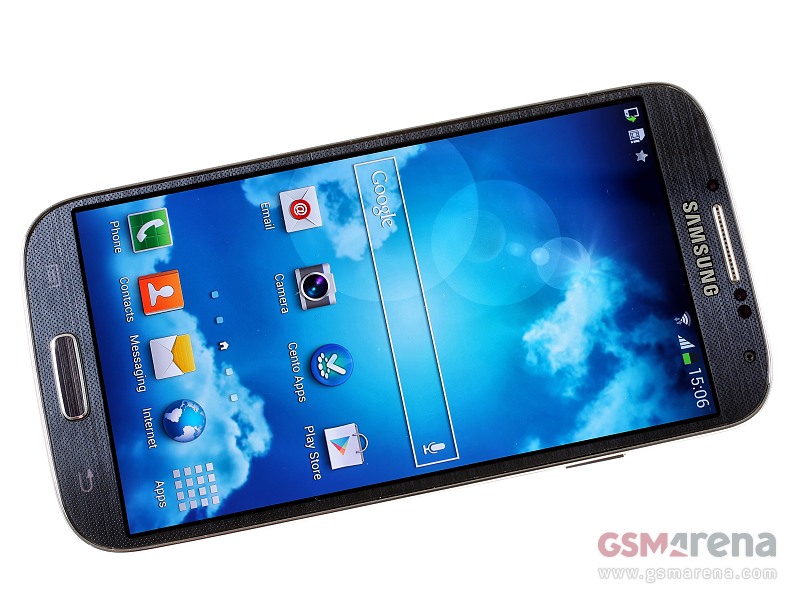
Samsung Galaxy S4 official photos
The new Samsung flagship improves on just about every aspect of the
previous generation, coupling more powerful hardware with another
handful of new software features. With a bunch of new sensors too, the
Galaxy S4 aims to be your must-have all-in-one tool.
With the Galaxy S4, Samsung clinches its goal of global
smartphone domination. The supercharged Android 4.2 Jelly Bean device
may look like a toy compared with the stunning HTC One and the dapper iPhone 5. But taken together, its blazing quad-core
processor, colorful 5-inch HD screen, sharp-shooting 13-megapixel
camera, and mile-high stack of software extras make the Galaxy S4 the
most powerful superphone anywhere in the world.
What does the Galaxy S4 have? A better question is: what doesn't it have? There's the 1080p screen, zippy processing speeds that are ideal for gaming, and an IR blaster that can control your TV. Then
there's the parade of camera tricks that cram action shots into one
scene, use both front and back cameras, and film a video in slow-mo. The
GS4 can harness your eyeballs to pause video, and it can answer a phone
call with the wave of your hand. Unlike the HTC One and the iPhone 5,
it also piles on expandable storage space and a removable battery.
It's true: most of the GS4's featurettes aren't essential -- and
some aren't even very useful, like the camera's Eraser mode, which I
never got to work, a subpar optical reader, and a translation tool that
just duplicates what Google Translate already does. While none stands
out as a must-have, cannot-possibly-live-without extra, these features
do add up to a compelling testament that the Galaxy S4 is more than a
step ahead of the pack.
So, if you want a lovingly crafted
statement phone that barely strays from Android's core offering, then
buy the HTC One, which also has double the internal storage for about
the same price. But if you're looking for a superphone that surpasses
all other handsets on the features front, then you'll find in this
deserving all-around flagship a strong mix of extremely competent
hardware and aspirational software with very few major drawbacks.
Design and build
Throughout the lifetime of Samsung's Galaxy S line, one of the biggest complaints levied against the
manufacturer was -- and is -- how its plastic construction and
flimsier-looking industrial design fall short compared with premium
rivals from Apple and HTC.
No, Samsung sticks by plastic,
and points to only a handful of Android enthusiasts who really care
about vaunted materials like aluminum and glass. Yet the phone maker has
also made an effort to add more "refined" touches to the Galaxy S4.
The Samsung Galaxy S4 is made of more modest material than the HTC One, left, and iPhone 5.
Josh Miller/CNET
Indeed, when you compare the S3 and S4 side by side, you note a
more rectangular home button, and metallic accents around the rim. The
S4's 5-inch screen is taller and the bezel surrounding the display
slimmer. Its volume and power/lock buttons are metallic-looking
polycarbonate, and tooled to have slanted sides and a flat top. Look
closely, and you'll see that the gaps around these controls are
narrower, too.
The GS4's metallic spines are also reworked
to be steeper and less curved than the Galaxy S3. In fact, while Samsung
boasted its GS3 was inspired by nature, the GS4's straight sides seem
to be inspired by the iPhone 5 or HTC One.
Samsung's Galaxy S4, left, looks a lot like its predecessor, the Galaxy S3.
Josh Miller/CNET
At 5.4 inches tall by 2.8 inches by 0.3 inch thick, the Galaxy S4
is actually 0.7 millimeter thinner than GS3, and at 4.6 ounces, it's 0.7
ounce lighter as well. Yet, the S3 and S4 generations still look so
similar, you might not know the difference if you're not looking
closely. When in doubt, flip the S4 over to see the new tiny
black-and-silver diamond design on the black mist model, or a similar
pinprick design on the white frost edition. As with the Galaxy S3's
brushed-plastic backing, the newer generation is so reflective, you
could use it as a makeshift mirror.
However, despite this fact, the
screen on the S4 has been increased once more, to a whopping 5-inch
display with Full HD resolution. This means the same amount of pixels
you'd have seen on a TV that cost well over £1,000 four years ago is now
riding around in your pocket. OK, it's no longer a big deal, but that
doesn't mean it's not a greatly impressive screen.
Let's
not pretend that Samsung is a pioneer in this area either: like a great
many features of the Galaxy S4, the phone borrows a lot from the other
top smartphones of the moment. Both the Sony Xperia Z1 and the HTC One
have screens that rock the same resolution, but neither of them have
the jaw-dropping clout of the Super AMOLED HD screen on offer here.
On
top of that, there's a much faster processor packed under the hood,
ample storage space for media thanks to an expandable memory card slot,
and the likes of 4G, Bluetooth 4.0, NFC and pretty much any other connection you care to mention on board.
Samsung
has tried to supplement this with a tranche of software upgrades too,
meaning a more powerful camera, a better way to communicate with your
friends and consume media, and interestingly a big push into health
through dedicated apps too.
The Samsung Galaxy S4
costs the same as the HTC One, give or take a pound or two, on
contract. This now puts it down around £29 per month, which isn't too
bad for such a high-end model.
It
can now also be had for just £420 on PAYG with EE, which makes it a
much better proposition... and is much cheaper than the equivalent iPhone 5C too.
But
before we dissect all the possibilities the phone has to offer, let's
look at the design. As we mentioned, it's impressive in its form factor,
thanks to the sub-8mm thickness, and at 130g it manages to still be
light without shaving off so much heft that you feel like you've got a
flimsy piece of plastic.
That's
probably the biggest compliment we can pay the Samsung Galaxy S4 -
where its predecessor felt a little bit cheap in the hand, the S4
manages to bring a much more solid build and better construction to
boot.
So while the "faux
metal" band makes a comeback on this model, it looks a lot more premium.
And there's very little flex in the chassis when you hold it tightly,
which was another problem with the Galaxy S3 at times.
It
can get dented very easily though, and be careful not to crack your
screen if you do so - we've heard of a few instances where this has
happened to S4 users, although that can be said of many other
polycabonate smartphones.
That
doesn't mean that the phone is completely remodelled from the S3 - it's
very similar in appearance, so much so that a number of people asking
to see it during our review thought we were palming them off with our
old S3. The polycarbonate chassis remains, but that brings with it the
faithful battery cover, which conceals a removable battery and microSD
slot.
We're
not so fussed about the battery being able to drop out of the phone -
so few people carry around a spare battery, and nowadays portable
charging blocks are becoming so cheap and light that they make much more
sense too.
We'd almost
prefer something like the Sony Xperia Z1, which has a refined and
packaged chassis but doesn't need a removable battery: it makes use of a
slot instead for the memory card. This integrated nature would make for
a slightly more premium feel to the phone.
However, it's a small gripe with the S4, as while the cover feels flimsy, it's better than it was on the S2 and the S3, and they both sold like hot cakes.
In
the hand, the Samsung Galaxy S4 feels much better than any other
Samsung phone we've held (apart from the gargantuan smartphones the
brand used to make - the i8910 Omnia HD
might have been built like a brick, but it felt wonderful to hold). The
screen's spread towards the sides of the phone means a much narrower
bezel, and the effect is certainly impressive.
It
might look very similar to the S3, but when you take the Samsung Galaxy
S4 up close, you really start to appreciate the nuances.
We'd say it feels a lot more like the LG Optimus G
range now - when we first picked it up, we were struck with how similar
it felt in terms of sturdiness and the polycarbonate construction to
the LG Optimus G Pro.
It's since been mimicked once more by the LG G2,
which is a real competitor to this handset - it's got the same uglier
plastic case, but much improved innards at the same price.
That's
no criticism, as the device is well built, but it has a similar rounded
feel. This is intriguing given the history of the two companies, and
shows more of a leaning towards the plastic shell from the Asian brands
in general.
Buttonry
has barely changed from before - the power button has been shifted
slightly on the right-hand side, and is now much easier to hit. Samsung
has clearly taken some lessons from the Galaxy Note 2, which has a really well positioned power/lock button.
The
volume key is less easy to hit, and could be lower down in our eyes,
but the travel on both of these buttons is satisfying, and you'll always
know when you've hit them.
The
plastic used on the home key has been upgraded too, with a more solid
feel under the thumb when you press down to get back to the main home
screen. The two buttons flanking it give you access to menus or take you
back from whence you came, and while both are easily hidden, they light
up nicely with an even glow when called into action.
There
are loads of sensors on the front of the phone above the screen,
including cameras to track your eyes, a 2MP camera for HD video calling
and a proximity sensor for knowing where the phone is in relation to
your ear. On the white review unit we had, their presence looks rather
ugly either side of the generous earpiece, but on the darker models this
is less of an issue.
The other notable addition to the design of the Galaxy S4
is the infra red blaster on the top of the phone. This enables you to
control your TV, satellite box, DVD player, amp and even air
conditioner. Again, this isn't a new feature, but it works well in
practice, and despite being small is powerful enough indeed.
Other
than that, there's not a lot more to say about the design of the phone,
as it's just a little underwhelming. We know it's unfair to lambast a
brand for not overhauling the design every year, but in the One X and the One, HTC has proven that it is possible to offer up a new design each time around and still keep things attractive.
Looking
so similar to the Galaxy S3, you can't help but feel Samsung has gone a
little too Apple and created something more in keeping with the Samsung
Galaxy S3S - a minor update to a great phone to keep those coming out
of contract happy that they have a premium phone to upgrade to.
We
do implore you to get the phone in your hand before making a judgement
though - while it's not got the best design on the market when it comes
to materials, it's a big step forward compared to the Galaxy S3 and
allows for a grippy and easy-to-hold phone, with a whopping screen
inside.
It still feels cheap as chips compared to the iPhone 5S and HTC One though.
But
to just dismiss it for being plastic would be doing the S4 a disservice
as it has so much more going for it than that, but it's worth
remembering that to a lot of people, the way a phone looks is as
important as how much RAM it's got on board and how fast the CPU is - if
not more so.
All about the screen Let's head back to
the screen for a minute. The 5-inch 1080p HD display yields a pixel
density of 441ppi, which is higher than Apple's 321ppi screen and lower
than the HTC One's 468ppi screen. In the end, I'm not sure how much these pixel density wars matter. The naked eye doesn't calibrate numbers, but it
does understand if an image looks rich and sharp and detailed, versus
dull and blurred.
A closer look at the "frost white" Galaxy S4.
Jessica Dolcourt/CNET
Carrying on its fine tradition, the Galaxy S4's HD AMOLED display
nails it with color saturation and contrast, sharply defined edges and
details. Articles are easy to read, gameplay looks good, and photos and
videos look terrific.
The Galaxy S4 is a little large for more snugly-fitting pockets.
Josh Miller/CNET
In a new display setting, Samsung attempts to correct an old complaint about certain colors, like green, looking too
saturated. In the screen mode settings, you can choose to let the GS4
auto-adjust the color tone depending on what you're looking at. As on
the Galaxy Note 2, you can also manually select from dynamic,
professional photo, and movie presets, the latter of which CNET display
guru David Katzmaier says yields the most accurate colors.
There are a few other important things
to note about the Galaxy S4's display besides color and sharpness. As
with the GS3, this year's model is highly reflective indoors and out,
and even at its full brightness, it can seem dim outside when fighting
bright light.
Outdoor readability in strong sunlight is
really tough; when taking photos, I very often couldn't tell that my
finger covered the lens until I got back inside, a plight that ruined
several pictures. Now would have been the time for Samsung to follow
Nokia's lead with its excellent polarized screen filter on phones like
the Nokia Lumia 920.
A look at the Galaxy S4's B-side.
Sarah Tew/CNET
At least Samsung did mimic another terrific Nokia implementation,
giving the S4 a sensitive screen you can navigate with a gloved hand in
addition to the naked finger.
On top of possessing a sensitive screen, the Galaxy S4 is also the first commercially available device to feature the thinner, stronger Gorilla Glass 3 cover glass.
1080p Super AMOLED display is what geeks' dreams are made of
One of the most important updates that the Samsung Galaxy S4 brings
is the new 5" Super AMOLED screen of 1080p resolution. While it does
have a PenTile matrix, the 441 ppi pixel density makes sure you won't be
able to spot the hated cross-hatch pattern.
Key features
Quad-band GSM/GPRS/EDGE; quad-band 3G with HSPA; LTE
5" 16M-color 1080p Super AMOLED capacitive touchscreen with Gorilla Glass 3
Smart volume and Adapt Sound features for the music player
Main disadvantages
Design is a bit played out by now
Hyperglaze finish doesn't feel as premium as aluminum on HTC One or glass on Xperia Z
No FM radio
Video recording is slightly worse than on the Galaxy S III; FOV in video is pretty narrow
Shared camera interface makes framing tricky
So, there are enough major wows, some minor ohs and just a few oh
wells - not a bad achievement when you are succeeding the most popular
droid of all time. The Samsung Galaxy S4 was always expected to aim for
the top, but its announcement still managed to surprise a few. The fact
that the Koreans squeezed a larger screen, a bigger battery and more
power into something smaller than the Galaxy S III is impressive enough
in its own right, but the novelties certainly don't end there.
Samsung Galaxy S4 at ours
We only got the chance to get to know a few of the Samsung Galaxy S4
exclusive software tricks in our preview, but we'll be testing the full
set this time around. The new camera also showed promise and we'll put
it through all the motions to find out if it can really live up to its
potential.
The phone's screen is a big deal, no doubt, but in my opinion, the
other most interesting new real estate lies north of its display.
A 2-megapixel front-facing camera sits in the upper-right corner,
neighbored to the left by ambient light and proximity sensors. To the
left of the speaker grill is the phone's IR, or infrared, sensor.
There's also an LED indicator at the top left corner. This will glow or
blink green, red, or blue to indicate certain activities.
An infrared blaster turns your Galaxy S4 into a universal TV and DVR remote.
Sarah Tew/CNET
Sharing the top edge with the phone's 3.5-millimeter headset jack
is the Galaxy S4's brand-new IR blaster, which you'll use in conjunction
with the Watch On app as a TV remote (it works!) All things being
equal, I prefer how HTC integrated its IR blaster in the One's power
button.
Below the screen, the home button takes you home
(press), launches Samsung's S Voice app (double press), and loads up
recently opened apps (hold). Press and hold the menu button to launch
the Google Search app with Google Now. The back button is self-explanatory.
You'll adjust volume on the left spine, charge the phone from the
bottom, and turn the phone on and off from the right spine. On the back,
you'll see the 13-megapixel shooter and LED flash just below. Pry off
the back cover to get to the microSD card slot, SIM card slot, and
battery.
Samsung worked on making the GS4's volume and power buttons look more high-end.
Josh Miller/CNET
So do I like the new design? I do. Its sharper edges do make it
look like a more premium device than its predecessor, but it won't ever
be as eye-popping as the gorgeous HTC One or as understatedly elegant as
the iPhone 5. Still, it's pleasant to look at and, in my opinion, more
comfortable to hold than the other two.
The only thing I
don't like is how Samsung's power/lock screen seems to easily light up
the phone while it's tossed around in my purse. Over the years, this has
been a constant personal annoyance, not only to find a phone turned on
that I had clearly turned off, but more importantly, to see my handset's
battery level low because I hadn't realized the screen was sucking it
down. I'd probably prefer this button up top.
OS and interface
The Galaxy S4 proudly runs Android
4.2.2 beneath its very highly customized Touch Wiz interface. Argue the
pluses and minuses of stock Android versus overlay all you want -- Touch
Wiz has long looked outdated and stale (especially compared with HTC's fresh new UI,) but Samsung's pile of software lets the GS4 go places that a stock Android phone can't even dream about without rooting and mods.
Take my favorite new interface
addition, for example. Samsung has bulked up its one-touch system icons
in the notifications shade. Tap a new button in the upper right corner
to expand the list to 15 icons you'll no longer have to dig through
settings menus to find. If you press the edit button, you'll be able to
drag and drop icons to reorder them. This is very cool and extremely
useful for finding and toggling settings.
The
new notifications shade on the Galaxy S4 adds a heap of new one-touch
settings options; you can reorder their positions in the edit menu.
Screenshot by Jessica Dolcourt/CNET
Menus play a huge role in the Touch Wiz ecosystem, so new users
shouldn't neglect them. This is where a tremendous range of editing and
advanced settings options live for apps as diverse as the home screen,
the browser, the keyboard, and so on.
In an attempt to
simplify the settings menu, the GS4's gets a makeover that breaks up
topics into separate screens for connections, device items like the lock
screen, gestures, and keyboard settings, an accounts pane, and the More
category for battery, storage, and security concerns.
Keyboard options
I have a love-hate relationship with every virtual keyboard I
meet. I demand grammatical and spelling accuracy, but am also apparently
a sloppy typist. Punctuation always takes too long to insert and
autocorrect rarely seems smart enough.
Swype and the default Samsung keyboard are two options. You can also input voice and handwriting besides.
Screenshot by Jessica Dolcourt/CNET
The Galaxy S4 gives you a few options. There's the standard
Samsung keyboard, which lets you turn on SwiftKey Flow for tracing out
words. There's also a separate Swype keyboard you can use instead.
I still became aggravated with mistakes and a slower typing flow
than I wanted, but I did like the multiple Samsung keyboard options to
introduce handwriting or insert images from the clipboard -- not that I
can see myself using either.
Lock screen
In the Galaxy S4, the lock screen has become a more customizable
place. You'll still choose if you swipe to unlock or use a passcode or
face scan, and you can still add and order lock screen icons that serve
as shortcuts to the camera, search, and your contacts.
Now, however, there are lock screen widget options, similar in concept to what you can get on Windows Phone, but different in execution. For example, you choose
if you'd like to see the clock or a personal message on the screen, and
if you'd like to swipe to open a list of favorite apps or launch the
camera (I chose the camera and clock).
You can choose from a couple of widgets on the lock screen, but better swipe on top to unlock to the app.
Screenshot by Jessica Dolcourt/CNET'
Getting the camera to open from the lock screen isn't all that
intuitive. The trick is to swipe right to left near the top of the
widget. If you swipe on the bottom half of the page, you'll go straight
into the home screen.
There's also a nice new lock screen
effect: Light. With Air View enabled, a point of light follows your
fingertip as you hover over the display.
Easy mode If the full Touch Wiz experience feels too confusing, Samsung is trying what others, such as Korean competitor Pantech, have done to simplify its take on Android with an easy mode.
Around in Samsung products since the Galaxy Note
2, easy mode, which you can start during the setup process or find
later in the settings, replaces your home screens and reskins some
critical apps (calendar, browser, contact list, and so on) to pare down
the quantity of confusing options.
Easy Mode vastly simplifies the Android experience on the home screens and within certain key apps.
Screenshot by Jessica Dolcourt/CNET
You'll still get access to core apps and features, even some extra
camera modes. The icons and fonts enlarge across the easy-mode apps,
and the browser includes a plus/minus icon for further increasing the
phone's font size. The settings menu, however, remains the same, and
it's easy to toggle back and forth from the "light" interface to full-on
Touch Wiz.
Eye-tracking and gestures Eye-tracking
software sounds like a cool, futuristic power for controlling your phone
with your peepers, but that's really only partway true. It isn't so
much that the cursor or text follows the movement of your eyes, which
you probably wouldn't want anyhow, if you think about it. More
generally, the software knows when you're paying attention and when you
avert your gaze.
Smart Pause and Smart Scroll are two
features that build off the Galaxy S3's optional Smart Stay feature,
which kept the screen from dimming when you looked at it. In the GS4,
tilting the screen up or down while looking at it scrolls you up or
down, say if you're reading a CNET story, of course. As a daily commuter
with one hand on the phone and one on a hand strap, I think this could
be a more convenient way to catch up with news while on the train or
bus.
With Smart Pause turned on, videos pause when you look away and start up again when you focus back on the screen.
Sarah Tew/CNET
I really like the idea of Smart Pause, which halts a video you're
watching when your eyes dart away, then resumes when you start paying
attention again. Smart Pause was more responsive and easier to control
than the scrolling, which experienced some abrupt motions and a short
lag time.
While you can make googly eyes at the GS4, most
gestures are still reserved for your fingertips. Hovering features known
as Air View make their way from the stylus-centric Galaxy Note 2 and Galaxy Note 10.1 tablet to the Galaxy S4, but replace the stylus with your digit.
Hover your finger and you can preview a video clip or image from
the photo gallery, glance at browser tab thumbnails, find your place on a
video timeline, and check out an e-mail. You'll also be able to magnify
calendar events and get a closer look in speed dial. As I mentioned
above, Flipboard has built a customized app to work with Air View that
lets you hover over a tile to see which articles lie beneath.
You can control the Galaxy S4 by waving your hand in front of the camera sensor.
Sarah Tew/CNET
In addition to hovering with a fingertip, you can wave or wipe
your whole hand in front of the screen (and sensor near the Samsung
logo) to navigate around. For example, enable this gesture and you can
agitate your palm to pick up the phone or switch songs in a playlist.
Steadily sliding your hand back and forth can advance photos in a
gallery, or browser tabs. You can also scroll up and down in a list.
The feature was a little jerky and jumpy when I tried it, but it
did work. As with eye-tracking, you'll have to wait a half-second to see
results. Luckily, air gestures are sensitive up to 3 or 4 inches off
the top of the phone, so you have a little latitude...or altitude, as it
were.
Samsung really envisioned using these gestures in
specific scenarios, mostly when your hands are already full with
something else. For instance, you'll probably never wave your hand over
the phone to answer it unless you're in a car,
but when you do, it'll automatically pick up in speakerphone mode. If
you have Bluetooth pairing, it'll kick into the car's Bluetooth if you
answer that way.
Likewise, passing your hand over the sensor to advance music titles works best when your phone is docked on your desk.
S Voice and Google Now
S Voice is Samsung's answer to Apple's Siri and is present on the
Galaxy S4. S Voice can be used to initiate a call, dictate text, play
music, open an app, change a setting, make a memo (including voice
memo), add a reminder, schedule an event, set an alarm or timer, check
the weather, do a search on the internet, look for local listings (e.g.
nearby restaurants) and even get an answer to a question.
S Voice
S Voice does duplicate parts of Google Now, but being less search
focused it tries to do more on the actual phone and it has some added
features. Some of these are available outside of S Voice too, so you can
set the Galaxy S4 to answer a call, snooze an alarm, take a photo and
what not by voice commands even when S Voice isn't running. The problem
with S Voice is not nearly as fast or as accurate at recognizing your
speech input as Now.
Naturally, being a Jelly Bean smartphone, the Galaxy S4 also comes with Google Now.
Google Now integrates with your Google account and can access your
daily routine, internet searches, email, etc. and give you information
relevant to your interests and daily needs.
It provides traffic information to your work or home, knows those
scores of sports teams you follow, gives you the weather forecast for
your city and can even tell you who Kevin Spacey is.
Google Now
Google Now also has its own separate widget on the homescreen.
Battery life
Ah, the old battery life test. One of
the world's most difficult things to rate, thanks to the sheer range of
things you can do with the phone to keep it from throwing out all its
juice in a heartbeat.
If you can't be bothered to read why, just understand that Galaxy S4 = pretty good battery life.
For
one person the Galaxy S4 is a treasured beast, only brought out into
the dappled light to check emails manually once an hour for most of the
day. For the next it's an all-powerful media gruntmonkey, one that will
be streaming movies over a 4G connection while auto-updating every app
under the sun.
Whatever you use your phone for, in our eyes it should be able to handle what the handset's main USPs are.
But
the good news is that the Samsung Galaxy S4 is able to handle all the
things you can throw at it and still keep the 2600mAh battery chugging
along at the end of the day. We found that in general use it was very
well received, as nothing we found could hurt it.
Our
usual test is performed on the commute to work, the time where we're at
our most 'phone-use-y'. For this test, like all other phones, we
streamed the audio over Bluetooth headphones (Rockaway Novero, if you're
asking).
A
10 minute cycle ride with music playing dropped things by 1%. Streaming
video over 4G for 10 minutes with full brightness on the screen pulled
down another 3%. Then it was more music for 30 minutes, which ate
another 2%, and then downloading a 86MB game file over 4G, which munched
3%.
A little more music playing, combined with general
email checking and testing out the air gestures, air view and smart
scroll saw a battery drain of just over 10% for the hour we were
trundling to work. That's really impressive, as we reckon high drain
capability of 10% per hour will lead to more than enough juice come the
end of the day.
We never found ourselves in that
situation, which is great. You can always pop in another battery, thanks
to this being removable, but in truth, it wasn't needed.
We
will say that those that like gaming, movie watching and internet
browsing will struggle to make the battery last on this phone, as the
screen is the biggest drain. That sounds obvious, but we're actually
happy that the Galaxy S4 isn't one of those devices that will see your
battery juicing down from an overly-enthusiastic background syncing
process.
After a few months of using the Samsung Galaxy
S4, we found that the battery life was definitely better than other
models on the market. With medium to low usage, you'll easily get to 50%
by the end of the working day, and that's including some music
streaming, internet browsing and video watching.
The
Galaxy S4 has an excellent sleep mode that means that when it's inactive
it can really drop the drain on the CPU, and achieve that in a much
better manner than other devices.
While the S4 is OK, the
lower-end CPU isn't up to the power of the Qualcomm 800 seen in the LG
G2 and Sony Xperia Z1 Compact - these are much more power efficient and
are even more adept at connecting to wearables without an impact on
battery life.
The GoodThe Samsung Galaxy S4
has Android 4.2.2, a fantastic camera, a powerful quad-core processor,
and software solutions for just about every scenario -- including
working as a TV/DVR remote. It's also comfortable in hand and has NFC, a
user-replaceable battery, and a microSD storage slot.
The BadIts
screen is dimmer than competitors', its plastic design gives it a
cheaper look than its rivals, and we found the Galaxy S4's power button
turned on at undesirable times. Not all camera modes work as promised,
and a long list of software features can quickly overwhelm and confuse.
The Bottom LineIts
laundry list of features require time and effort to truly master, but
the Galaxy S4 is the top choice for anyone looking for a big-screen,
do-everything smartphone.